SPRUIE9D May 2017 – May 2024 DRA74P , DRA75P
- 1
- Read This First
-
1 Introduction
- 1.1 DRA75xP, DRA74xP, DRA77xP, DRA76xP Overview
- 1.2 DRA75xP, DRA74xP, DRA77xP, DRA76xP Environment
- 1.3
DRA75xP, DRA74xP, DRA77xP, DRA76xP Description
- 1.3.1 MPU Subsystem
- 1.3.2 DSP Subsystems
- 1.3.3 EVE Subsystems
- 1.3.4 Imaging Subsystem
- 1.3.5 Camera Interface Subsystem
- 1.3.6 IPU Subsystems
- 1.3.7 IVA-HD Subsystem
- 1.3.8 Display Subsystem
- 1.3.9 Video Processing Subsystem
- 1.3.10 Video Capture
- 1.3.11 3D GPU Subsystem
- 1.3.12 BB2D Subsystem
- 1.3.13 On-Chip Debug Support
- 1.3.14 Power, Reset, and Clock Management
- 1.3.15 On-Chip Memory
- 1.3.16 Memory Management
- 1.3.17 External Memory Interfaces
- 1.3.18 System and Connectivity Peripherals
- 1.4 DRA75xP, DRA74xP, DRA77xP, DRA76xP Family
- 1.5 DRA75xP, DRA74xP, DRA77xP, DRA76xP Device Identification
- 1.6 DRA75xP, DRA74xP, DRA77xP, DRA76xP Package Characteristics Overview
- 2 Memory Mapping
-
3 Power, Reset, and Clock Management
- 3.1
Device Power Management Introduction
- 3.1.1
Device Power-Management Architecture Building Blocks
- 3.1.1.1 Clock Management
- 3.1.1.2 Power Management
- 3.1.1.3 Voltage Management
- 3.1.2 Power-Management Techniques
- 3.1.1
Device Power-Management Architecture Building Blocks
- 3.2 PRCM Subsystem Overview
- 3.3 PRCM Subsystem Environment
- 3.4 PRCM Subsystem Integration
- 3.5
Reset Management Functional Description
- 3.5.1 Overview
- 3.5.2 General Characteristics of Reset Signals
- 3.5.3 Reset Sources
- 3.5.4 Reset Logging
- 3.5.5 Reset Domains
- 3.5.6
Reset Sequences
- 3.5.6.1 MPU Subsystem Power-On Reset Sequence
- 3.5.6.2 MPU Subsystem Warm Reset Sequence
- 3.5.6.3 MPU Subsystem Reset Sequence on Sleep and Wake-Up Transitions From RETENTION State
- 3.5.6.4 IVA Subsystem Power-On Reset Sequence
- 3.5.6.5 IVA Subsystem Software Warm Reset Sequence
- 3.5.6.6 DSP1 Subsystem Power-On Reset Sequence
- 3.5.6.7 DSP1 Subsystem Software Warm Reset Sequence
- 3.5.6.8 DSP2 Subsystem Power-On Reset Sequence
- 3.5.6.9 DSP2 Subsystem Software Warm Reset Sequence
- 3.5.6.10 IPU1 Subsystem Power-On Reset Sequence
- 3.5.6.11 IPU1 Subsystem Software Warm Reset Sequence
- 3.5.6.12 IPU2 Subsystem Power-On Reset Sequence
- 3.5.6.13 IPU2 Subsystem Software Warm Reset Sequence
- 3.5.6.14 EVE1 Subsystem Power-On Reset Sequence
- 3.5.6.15 EVE1 Subsystem Software Warm Reset Sequence
- 3.5.6.16 EVE2 Subsystem Power-On Reset Sequence
- 3.5.6.17 EVE2 Subsystem Software Warm Reset Sequence
- 3.5.6.18 Global Warm Reset Sequence
- 3.6
Clock Management Functional Description
- 3.6.1 Overview
- 3.6.2 External Clock Inputs
- 3.6.3
Internal Clock Sources and Generators
- 3.6.3.1 PRM Clock Source
- 3.6.3.2 CM Clock Source
- 3.6.3.3 Generic DPLL Overview
- 3.6.3.4 DPLL_PER Description
- 3.6.3.5 DPLL_CORE Description
- 3.6.3.6 DPLL_ABE Description
- 3.6.3.7 DPLL_MPU Description
- 3.6.3.8 DPLL_IVA Description
- 3.6.3.9 DPLL_USB Description
- 3.6.3.10 DPLL_EVE Description
- 3.6.3.11 DPLL_DSP Description
- 3.6.3.12 DPLL_GMAC Description
- 3.6.3.13 DPLL_GPU Description
- 3.6.3.14 DPLL_DDR Description
- 3.6.3.15 DPLL_PCIE_REF Description
- 3.6.3.16 APLL_PCIE Description
- 3.6.4
Clock Domains
- 3.6.4.1 CD_WKUPAON Clock Domain
- 3.6.4.2 CD_DSP1 Clock Domain
- 3.6.4.3 CD_DSP2 Clock Domain
- 3.6.4.4 CD_CUSTEFUSE Clock Domain
- 3.6.4.5 CD_MPU Clock Domain
- 3.6.4.6 CD_L4PER1 Clock Domain
- 3.6.4.7 CD_L4PER2 Clock Domain
- 3.6.4.8 CD_L4PER3 Clock Domain
- 3.6.4.9 CD_L4SEC Clock Domain
- 3.6.4.10 CD_L3INIT Clock Domain
- 3.6.4.11 CD_IVA Clock Domain
- 3.6.4.12 CD_GPU Description
- 3.6.4.13 CD_EMU Clock Domain
- 3.6.4.14 CD_DSS Clock Domain
- 3.6.4.15 CD_L4_CFG Clock Domain
- 3.6.4.16 CD_L3_INSTR Clock Domain
- 3.6.4.17 CD_L3_MAIN1 Clock Domain
- 3.6.4.18 CD_EMIF Clock Domain
- 3.6.4.19 CD_IPU Clock Domain
- 3.6.4.20 CD_IPU1 Clock Domain
- 3.6.4.21 CD_IPU2 Clock Domain
- 3.6.4.22 CD_DMA Clock Domain
- 3.6.4.23 CD_ATL Clock Domain
- 3.6.4.24 CD_CAM Clock Domain
- 3.6.4.25 CD_GMAC Clock Domain
- 3.6.4.26 CD_VPE Clock Domain
- 3.6.4.27 CD_EVE1 Clock Domain
- 3.6.4.28 CD_EVE2 Clock Domain
- 3.6.4.29 CD_EVE3 Clock Domain
- 3.6.4.30 CD_RTC Clock Domain
- 3.6.4.31 CD_PCIE Clock Domain
- 3.7
Power Management Functional Description
- 3.7.1 PD_WKUPAON Description
- 3.7.2 PD_DSP1 Description
- 3.7.3 PD_DSP2 Description
- 3.7.4 PD_CUSTEFUSE Description
- 3.7.5 PD_MPU Description
- 3.7.6 PD_IPU Description
- 3.7.7 PD_L3INIT Description
- 3.7.8 PD_L4PER Description
- 3.7.9 PD_IVA Description
- 3.7.10 PD_GPU Description
- 3.7.11 PD_EMU Description
- 3.7.12 PD_DSS Description
- 3.7.13 PD_CORE Description
- 3.7.14 PD_CAM (Physical PD_COREAON) Description
- 3.7.15 PD_MPUAON Description
- 3.7.16 PD_MMAON Description
- 3.7.17 PD_COREAON Description
- 3.7.18 PD_VPE Description
- 3.7.19 PD_EVE1 Description
- 3.7.20 PD_EVE2 Description
- 3.7.21 PD_EVE3 Description
- 3.7.22 PD_RTC Description
- 3.8 Voltage-Management Functional Description
- 3.9 Device Low-Power States
- 3.10
PRCM Module Programming Guide
- 3.10.1 DPLLs Low-Level Programming Models
- 3.10.2 Clock Management Low-Level Programming Models
- 3.10.3 Power Management Low-Level Programming Models
- 3.11 560
- 3.12 PRCM Software Configuration for OPP_PLUS
- 3.13
PRCM Register Manual
- 3.13.1 PRCM Instance Summary
- 3.13.2 CM_CORE_AON__CKGEN Registers
- 3.13.3 CM_CORE_AON__DSP1 Registers
- 3.13.4 CM_CORE_AON__DSP2 Registers
- 3.13.5 CM_CORE_AON__EVE1 Registers
- 3.13.6 CM_CORE_AON__EVE2 Registers
- 3.13.7 CORE_AON__EVE3 Registers
- 3.13.8 CM_CORE_AON__INSTR Registers
- 3.13.9 CM_CORE_AON__IPU Registers
- 3.13.10 CM_CORE_AON__MPU Registers
- 3.13.11 CM_CORE_AON__OCP_SOCKET Registers
- 3.13.12 CM_CORE_AON__RESTORE Registers
- 3.13.13 CM_CORE_AON__RTC Registers
- 3.13.14 CM_CORE_AON__VPE Registers
- 3.13.15 CM_CORE__CAM Registers
- 3.13.16 CM_CORE__CKGEN Registers
- 3.13.17 CM_CORE__COREAON Registers
- 3.13.18 CM_CORE__CORE Registers
- 3.13.19 CM_CORE__CUSTEFUSE Registers
- 3.13.20 CM_CORE__DSS Registers
- 3.13.21 CM_CORE__GPU Registers
- 3.13.22 CM_CORE__IVA Registers
- 3.13.23 CM_CORE__L3INIT Registers
- 3.13.24 CM_CORE__L4PER Registers
- 3.13.25 CM_CORE__OCP_SOCKET Registers
- 3.13.26 CM_CORE__RESTORE Registers
- 3.13.27 CAM_PRM Registers
- 3.13.28 CKGEN_PRM Registers
- 3.13.29 CORE_PRM Registers
- 3.13.30 CUSTEFUSE_PRM Registers
- 3.13.31 DEVICE_PRM Registers
- 3.13.32 DSP1_PRM Registers
- 3.13.33 DSP2_PRM Registers
- 3.13.34 DSS_PRM Registers
- 3.13.35 EMU_CM Registers
- 3.13.36 EMU_PRM Registers
- 3.13.37 EVE1_PRM Registers
- 3.13.38 EVE2_PRM Registers
- 3.13.39 EVE3_PRM Registers
- 3.13.40 GPU_PRM Registers
- 3.13.41 INSTR_PRM Registers
- 3.13.42 IPU_PRM Registers
- 3.13.43 IVA_PRM Registers
- 3.13.44 L3INIT_PRM Registers
- 3.13.45 L4PER_PRM Registers
- 3.13.46 MPU_PRM Registers
- 3.13.47 OCP_SOCKET_PRM Registers
- 3.13.48 RTC_PRM Registers
- 3.13.49 VPE_PRM Registers
- 3.13.50 WKUPAON_CM Registers
- 3.13.51 WKUPAON_PRM Registers
- 3.1
Device Power Management Introduction
-
4 Dual Cortex-A15 MPU Subsystem
- 4.1 Dual Cortex-A15 MPU Subsystem Overview
- 4.2 Dual Cortex-A15 MPU Subsystem Integration
- 4.3
Dual Cortex-A15 MPU Subsystem Functional Description
- 4.3.1 MPU Subsystem Block Diagram
- 4.3.2 Cortex-A15 MPCore (MPU_CLUSTER)
- 4.3.3 MPU_AXI2OCP
- 4.3.4 Memory Adapter
- 4.3.5 Realtime Counter (Master Counter)
- 4.3.6 MPU Watchdog Timer
- 4.3.7 MPU Subsystem Power Management
- 4.3.8 MPU Subsystem AMBA Interface Configuration
- 4.4
Dual Cortex-A15 MPU Subsystem Register Manual
- 4.4.1 Dual Cortex-A15 MPU Subsystem Instance Summary
- 4.4.2 MPU_CS_STM Registers
- 4.4.3 MPU_INTC Registers
- 4.4.4 MPU_PRCM_OCP_SOCKET Registers
- 4.4.5 MPU_PRCM_DEVICE Registers
- 4.4.6 MPU_PRCM_PRM_C0 Registers
- 4.4.7 MPU_PRCM_CM_C0 Registers
- 4.4.8 MPU_PRCM_PRM_C1 Registers
- 4.4.9 MPU_PRCM_CM_C1 Registers
- 4.4.10 MPU_WUGEN Registers
- 4.4.11 MPU_WD_TIMER Registers
- 4.4.12 MPU_AXI2OCP_MISC Registers
- 4.4.13 MPU_MA_LSM Registers
- 4.4.14 MPU_MA_WP Registers
-
5 DSP Subsystems
- 5.1 DSP Subsystems Overview
- 5.2 DSP Subsystem Integration
- 5.3
DSP Subsystems Functional Description
- 5.3.1 DSP Subsystems Block Diagram
- 5.3.2
DSP Subsystem Components
- 5.3.2.1 C66x DSP Subsystem Introduction
- 5.3.2.2
DSP TMS320C66x CorePac
- 5.3.2.2.1 DSP TMS320C66x CorePac CPU
- 5.3.2.2.2 DSP TMS320C66x CorePac Internal Memory Controllers and Memories
- 5.3.2.2.3
DSP C66x CorePac Internal Peripherals
- 5.3.2.2.3.1 DSP C66x CorePac Interrupt Controller (DSP INTC)
- 5.3.2.2.3.2 DSP C66x CorePac Power-Down Controller (DSP PDC)
- 5.3.2.2.3.3 DSP C66x CorePac Bandwidth Manager (BWM)
- 5.3.2.2.3.4 DSP C66x CorePac Memory Protection Hardware
- 5.3.2.2.3.5 DSP C66x CorePac Internal DMA (IDMA) Controller
- 5.3.2.2.3.6 DSP C66x CorePac External Memory Controller
- 5.3.2.2.3.7 DSP C66x CorePac Extended Memory Controller
- 5.3.2.2.3.8 L1P Memory Error Detection Logic
- 5.3.2.2.3.9 L2 Memory Error Detection and Correction Logic
- 5.3.2.3 DSP Debug and Trace Support
- 5.3.3 DSP System Control Logic
- 5.3.4 DSP Interrupt Requests
- 5.3.5 DSP DMA Requests
- 5.3.6 DSP Intergated Memory Management Units
- 5.3.7 DSP Integrated EDMA Subsystem
- 5.3.8 DSP L2 interconnect Network
- 5.3.9 DSP Boot Configuration
- 5.3.10 DSP Internal and External Memory Views
- 5.4 DSP Subsystem Register Manual
- 6 IVA Subsystem
-
7 Dual Cortex-M4 IPU Subsystem
- 7.1 Dual Cortex-M4 IPU Subsystem Overview
- 7.2 Dual Cortex-M4 IPU Subsystem Integration
- 7.3 Dual Cortex-M4 IPU Subsystem Functional Description
- 7.4 Dual Cortex-M4 IPU Subsystem Register Manual
-
8 Embedded Vision Engine
- 8.1
Embedded Vision Engine (EVE) Subsystem
- 8.1.1 EVE Overview
- 8.1.2 EVE Integration
- 8.1.3
EVE Functional Description
- 8.1.3.1 EVE Connection ID (ConnID) Mapping
- 8.1.3.2 EVE Processors Overview
- 8.1.3.3 Internal Memory Overview
- 8.1.3.4 Program Cache Architecture
- 8.1.3.5 EDMA
- 8.1.3.6 General-Purpose Inputs/Outputs
- 8.1.3.7 CME Signaling
- 8.1.3.8 Multi-EVE and VIP Usage Models
- 8.1.3.9 Memory Management Unit
- 8.1.3.10 Interrupt Control
- 8.1.3.11 Interprocessor Communication
- 8.1.3.12 Powerdown
- 8.1.3.13 Hardware-Assisted Software Self-Test – MISRs
- 8.1.3.14 Error Recovery – ARP32 and OCP Disconnect
- 8.1.3.15 Lock and Unlock Feature
- 8.1.3.16 EVE Memory Map
- 8.1.3.17 Debug Support
- 8.1.3.18 EVE L2_FNOC Interconnect
- 8.1.4 EVE Programming Model
- 8.1.5 EVE Subsystem Register Manual
- 8.1.6
Subsystem Counter Timer Module
- 8.1.6.1 Introduction
- 8.1.6.2 Functional Description
- 8.1.6.3 Use Case Examples
- 8.1.6.4 SCTM Register Manual
- 8.1.7 Software Message and System Event Trace
- 8.2
ARP32 CPU and Instruction Set
- 8.2.1 Overview
- 8.2.2 Features
- 8.2.3 Block Diagram
- 8.2.4
Architecture
- 8.2.4.1 Interface Description
- 8.2.4.2 Pipeline
- 8.2.4.3 Data Format
- 8.2.4.4 Endian Support
- 8.2.4.5 Architectural Register File
- 8.2.4.6
CPU Control Registers
- 8.2.4.6.1 Control Status Register (CSR)
- 8.2.4.6.2 Interrupt Enable Register (IER)
- 8.2.4.6.3 Interrupt Flag Register (IFR)
- 8.2.4.6.4 Interrupt Set Register (ISR)
- 8.2.4.6.5 Interrupt Clear Register (ICR)
- 8.2.4.6.6 Nonmaskable Interrupt (NMI) Return Pointer Register (NRP)
- 8.2.4.6.7 Interrupt Return Pointer Register (IRP)
- 8.2.4.6.8 Stack Pointer Register (SP)
- 8.2.4.6.9 Global Data Pointer Register (GDP)
- 8.2.4.6.10 Link Register (LR)
- 8.2.4.6.11 Loop 0 Start Address Register (LSA0)
- 8.2.4.6.12 Loop 0 End Address Register (LEA0)
- 8.2.4.6.13 Loop 0 Iteration Count Register (LCNT0)
- 8.2.4.6.14 Loop 1 Start Address Register (LSA1)
- 8.2.4.6.15 Loop 1 End Address Register (LEA1)
- 8.2.4.6.16 Loop 1 Iteration Count Register (LCNT1)
- 8.2.4.6.17 Loop 0 Iteration Count Reload Value Register (LCNT0RLD)
- 8.2.4.6.18 Shadow Control Status Register (SCSR)
- 8.2.4.6.19 NMI Shadow Control Status Register (NMISCSR)
- 8.2.4.6.20 CPU Identification Register (CPUID)
- 8.2.4.6.21 Decode Program Counter Register (DPC)
- 8.2.4.6.22 Time Stamp Counter Registers (TSCL and TSCH)
- 8.2.4.7 CPU Shadow Registers
- 8.2.4.8 Functional Units
- 8.2.4.9 Instruction Fetch
- 8.2.4.10 Alignment of 32-bit Instructions
- 8.2.4.11 Instruction Execution in Branch Delay Slot
- 8.2.4.12 Address Space
- 8.2.4.13 Program Counter Convention
- 8.2.4.14 Stack Pointer Convention
- 8.2.4.15 Global Data Pointer Convention
- 8.2.4.16 Conditional Execution
- 8.2.4.17
Hardware Loop Acceleration
- 8.2.4.17.1 Overview
- 8.2.4.17.2 Loop Registers
- 8.2.4.17.3 Loop Setup Instructions
- 8.2.4.17.4 Loop Operation
- 8.2.4.17.5 Call and Branch within Loop Context
- 8.2.4.17.6 Dynamic Changes to Loop Iteration Count
- 8.2.4.17.7 Interrupt Processing During HLA
- 8.2.4.17.8 HLA Usage in Interrupt Context
- 8.2.4.17.9 HLA Usage Restrictions
- 8.2.4.17.10 HLA Mapping Examples
- 8.2.4.18
Interrupts
- 8.2.4.18.1 Overview
- 8.2.4.18.2 Interrupt Processing
- 8.2.4.18.3 Interrupt Acknowledgment
- 8.2.4.18.4 Interrupt Priorities
- 8.2.4.18.5 Interrupt Service Table (IST)
- 8.2.4.18.6 Interrupt Flags
- 8.2.4.18.7 Interrupt Behavior
- 8.2.4.18.8 Interrupt Context Save and Restore
- 8.2.4.18.9 Nested Interrupts
- 8.2.4.18.10 Non-nested Interrupt Latency
-
8.2.A Instruction Set
- 8.2.A.1 Instruction Operation and Execution Notations
- 8.2.A.2 Instruction Syntax and Opcode Notations
-
8.2.A.3 Instruction Scheduling Restrictions
- 8.2.A.3.1 Restrictions Applicable to a Branch Delay Slot
- 8.2.A.3.2 Restrictions on Loops Using Hardware Loop Assist (HLA)
- 8.2.A.3.3 Restrictions on Other Types of Control Flow Instructions
- 8.2.A.3.4 Restrictions for Write Data Bypass to Control Register Reads
- 8.2.A.3.5 Restrictions for Write Data Bypass to Shadow Register Reads
- 8.2.A.3.6 Restrictions for Link Register Update
- 8.2.A.4 Instruction Set Encoding
-
8.2.A.5 Instruction Descriptions
- ABS
- ADD
- ADD
- ADD
- ADD
- ADD
- AND
- AND
- B(cc)
- B(cc)
- B(cc)
- BIRP
- BKPT
- BNRP
- CALL
- CALL
- CLR
- CLR
- CMP
- CMP
- CMP
- CMPU
- CMPU
- CMPU
- DIV
- DIVU
- EXT
- EXT
- EXTU
- EXTU
- IDLE
- LDB(U)
- LDB(U)
- LDB(U)
- LDB(U)
- LDB(U)
- LDB(U)
- LDB(U)
- LDB(U)
- LDH(U)
- LDH(U)
- LDH(U)
- LDH(U)
- LDH(U)
- LDH(U)
- LDH(U)
- LDH(U)
- LDW
- LDW
- LDW
- LDW
- LDW
- LDW
- LDW
- LDW
- LDRF
- LMBD
- MAX
- MAXU
- MIN
- MINU
- MOD
- MODU
- MPY
- MPYU
- MV
- MVC
- MVC
- MVC
- MVCH
- MVK
- MVKH
- MVKLS
- MVKS
- MVS
- MVS
- NEG
- NOP
- NOT
- OR
- OR
- RET
- REV
- ROT
- ROTC
- SADD
- SATN
- SET
- SET
- SHL
- SHL
- SHRA
- SHRA
- SHRU
- SHRU
- SLA
- SSUB
- STB
- STB
- STB
- STB
- STB
- STB
- STB
- STB
- STH
- STH
- STH
- STH
- STH
- STH
- STH
- STH
- STW
- STW
- STW
- STW
- STW
- STW
- STW
- STW
- STHI
- STRF
- SUB
- SUB
- SUB
- SUB
- SUB
- SWI
- XOR
- XOR
- 8.2.B Clock, Reset, and Dynamic Power Management
- 8.2.C Notes on Programming Model
- 8.3
VCOP CPU and Instruction Set
- 8.3.1 Module Overview
- 8.3.2 Features
- 8.3.3 Block Diagram
- 8.3.4 System Interfaces
- 8.3.5
Functional Description
- 8.3.5.1 Scalar-Vector Architecture
- 8.3.5.2 Vector Core Overview
- 8.3.5.3 Vector Control
- 8.3.5.4 Vector-Scalar Synchronization
- 8.3.5.5
Vector Computation
- 8.3.5.5.1 Vector Loop
- 8.3.5.5.2 Vector Register Initialization
- 8.3.5.5.3 Address Generator (agen)
- 8.3.5.5.4 Vector Load
- 8.3.5.5.5 Vector Arithmetic/Logic Operations
- 8.3.5.5.6 Vector Store
- 8.3.5.5.7 Table Lookup Operation
- 8.3.5.5.8 Histogram Operation
- 8.3.5.5.9 Circular Buffer Addressing Support
- 8.3.5.5.10 Load/Store Address Alignment Constraints
- 8.3.5.6 Load/Store Buffer and Scheduling
- 8.3.5.7 VCOP Per-Loop Overhead
- 8.3.5.8 VCOP Error Handling
- 8.3.5.9
Vector Operation Details
- 8.3.5.9.1 VABS
- 8.3.5.9.2 VABSDIF
- 8.3.5.9.3 VADD
- 8.3.5.9.4 VADDH
- 8.3.5.9.5 VADDSUB
- 8.3.5.9.6 VADD3
- 8.3.5.9.7 VADIF3
- 8.3.5.9.8 VAND
- 8.3.5.9.9 VANDN
- 8.3.5.9.10 VAND3
- 8.3.5.9.11 VBINLOG
- 8.3.5.9.12 VBITC
- 8.3.5.9.13 VBITDI
- 8.3.5.9.14 VBITI
- 8.3.5.9.15 VBITPK
- 8.3.5.9.16 VBITR
- 8.3.5.9.17 VBITTR
- 8.3.5.9.18 VBITUNPK
- 8.3.5.9.19 VCMOV
- 8.3.5.9.20 VCMPEQ
- 8.3.5.9.21 VCMPGE
- 8.3.5.9.22 VCMPGT
- 8.3.5.9.23 VDINTRLV
- 8.3.5.9.24 VDINTRLV2
- 8.3.5.9.25 VEXITNZ
- 8.3.5.9.26 VINTRLV
- 8.3.5.9.27 VINTRLV2
- 8.3.5.9.28 VINTRLV4
- 8.3.5.9.29 VLMBD
- 8.3.5.9.30 VMADD
- 8.3.5.9.31 VMAX
- 8.3.5.9.32 VMAXSETF
- 8.3.5.9.33 VMIN
- 8.3.5.9.34 VMINSETF
- 8.3.5.9.35 VMPY
- 8.3.5.9.36 VMSUB
- 8.3.5.9.37 VNOP
- 8.3.5.9.38 VNOT
- 8.3.5.9.39 VOR
- 8.3.5.9.40 VOR3
- 8.3.5.9.41 VRND
- 8.3.5.9.42 VSAD
- 8.3.5.9.43 VSEL
- 8.3.5.9.44 VSHF
- 8.3.5.9.45 VSHFOR
- 8.3.5.9.46 VSHF16
- 8.3.5.9.47 VSIGN
- 8.3.5.9.48 VSORT2
- 8.3.5.9.49 VSUB
- 8.3.5.9.50 VSWAP
- 8.3.5.9.51 VXOR
- 8.3.6 Debug Support
- 8.3.7 VCOP Register Manual
- 8.1
Embedded Vision Engine (EVE) Subsystem
-
9 Imaging Subsystem
- 9.1 ISS Overview
- 9.2
ISS Camera Adapter Layer (CAL)
- 9.2.1 ISS CAL Features
- 9.2.2 ISS CAL Integration
- 9.2.3
ISS CAL Functional Description
- 9.2.3.1 CAL Block Diagram
- 9.2.3.2 CAL Hardware and Software Reset
- 9.2.3.3 CAL Clock Configuration
- 9.2.3.4 CAL Power Management
- 9.2.3.5 CAL Interrupt Events
- 9.2.3.6 CAL Data Stream
- 9.2.3.7 CAL Pixel Extraction
- 9.2.3.8 CAL DPCM Decoding and Encoding
- 9.2.3.9 CAL Pixel Packing
- 9.2.3.10 CAL Write DMA
- 9.2.3.11 CAL Read DMA
- 9.2.3.12 CAL Video Port
- 9.2.3.13 CAL BYS Ports
- 9.2.3.14 CAL Registers Shadowing
- 9.2.4 ISS CAL Register Manual
- 9.3
ISS Image Signal Processor (ISP)
- 9.3.1 ISS ISP Overview
- 9.3.2 ISS ISP Integration
- 9.3.3
ISS ISP Functional Description
- 9.3.3.1 ISS ISP VP Functional Description
- 9.3.3.2
ISS ISP GLBCE Functional Description
- 9.3.3.2.1 ISS ISP GLBCE Overview
- 9.3.3.2.2 ISS ISP GLBCE Interface
- 9.3.3.2.3
ISS ISP GLBCE Core
- 9.3.3.2.3.1 ISS ISP GLBCE Core Key Parameters
- 9.3.3.2.3.2 ISS ISP GLBCE Iridix Strength Calculation
- 9.3.3.2.3.3
ISS ISP GLBCE Iridix Configuration Registers
- 9.3.3.2.3.3.1 ISS ISP GLBCE Iridix Frame Width
- 9.3.3.2.3.3.2 ISS ISP GLBCE Iridix Frame Height
- 9.3.3.2.3.3.3 ISS ISP GLBCE Iridix Control
- 9.3.3.2.3.3.4 ISS ISP GLBCE Iridix Control
- 9.3.3.2.3.3.5 ISS ISP GLBCE Iridix Strength
- 9.3.3.2.3.3.6 ISS ISP GLBCE Iridix Variance
- 9.3.3.2.3.3.7 ISS ISP GLBCE Iridix Dither
- 9.3.3.2.3.3.8 ISS ISP GLBCE Iridix Amplification Limit
- 9.3.3.2.3.3.9 ISS ISP GLBCE Iridix Slope Min and Max
- 9.3.3.2.3.3.10 ISS ISP GLBCE Iridix Black Level
- 9.3.3.2.3.3.11 ISS ISP GLBCE Iridix White Level
- 9.3.3.2.3.3.12 ISS ISP GLBCE Iridix Asymmetry Function Look-up-table
- 9.3.3.2.3.3.13 ISS ISP GLBCE Iridix Forward and Reverse Perceptual Functions Look-up-tables
- 9.3.3.2.3.3.14 ISS ISP GLBCE Iridix Tile Position and Size
- 9.3.3.2.3.3.15 ISS ISP GLBCE Iridix WDR Look-up-table
- 9.3.3.2.4 ISS ISP GLBCE Embedded Memory
- 9.3.3.2.5 ISS ISP GLBCE Programming Model
- 9.3.3.3 ISS ISP NSF3V Functional Description
- 9.3.3.4
ISS ISP IPIPEIF Functional Description
- 9.3.3.4.1 ISS ISP IPIPEIF Overview
- 9.3.3.4.2 ISS ISP IPIPEIF Top-Level Block Diagram
- 9.3.3.4.3 ISS ISP IPIPEIF Input Interface
- 9.3.3.4.4
ISS ISP IPIPEIF Data Path Selection
- 9.3.3.4.4.1 ISS ISP IPIPEIF INPSRC1 = 0 and INPSRC2 = 0
- 9.3.3.4.4.2 ISS ISP IPIPEIF INPSRC1 = 0 and INPSRC2 = 1
- 9.3.3.4.4.3 ISS ISP IPIPEIF INPSRC1 = 0 and INPSRC2 = 2
- 9.3.3.4.4.4 ISS ISP IPIPEIF INPSRC1 = 0 and INPSRC2 = 3
- 9.3.3.4.4.5 ISS ISP IPIPEIF INPSRC1 = 1 and INPSRC2 = 0
- 9.3.3.4.4.6 ISS ISP IPIPEIF INPSRC1 = 2 and INPSRC2 = 0
- 9.3.3.4.4.7 ISS ISP IPIPEIF INPSRC1 = 3 and INPSRC2 = 0
- 9.3.3.4.5 ISS ISP IPIPEIF Timing Generation
- 9.3.3.4.6 ISS ISP IPIPEIF Decompression (DPCM) Subblock: Unpack and Decompression Function
- 9.3.3.4.7 ISS ISP IPIPEIF Dark-Frame Subtraction Functionality
- 9.3.3.4.8 ISS ISP IPIPEIF Wide Dynamic Range WDR Merging Functionality
- 9.3.3.4.9 ISS ISP IPIPEIF (1, 2, 1) Averaging Filter for IPIPE Data Path
- 9.3.3.4.10 ISS ISP IPIPEIF Horizontal Pixel Decimator (Downsizer) for IPIPE Data Path
- 9.3.3.4.11 ISS ISP IPIPEIF RAW Data Gain for IPIPE Data Path
- 9.3.3.4.12 ISS ISP IPIPEIF (1, 2 ,1) Averaging Filter for H3A Data Path
- 9.3.3.4.13 ISS ISP IPIPEIF Horizontal Pixel Decimator (Downsizer) for H3A Data Path
- 9.3.3.4.14 ISS ISP IPIPEIF YUV4:2:2 8-bit Packed Data Input Coming From ISIF Module
- 9.3.3.4.15 ISS ISP IPIPEIF YUV4:2:0 Data Input for Memory-to-Memory Resize Operations
- 9.3.3.4.16 ISS ISP IPIPEIF Module Events and Status Checking
- 9.3.3.5
ISS ISP IPIPE Functional Description
- 9.3.3.5.1 ISS ISP IPIPE Overview
- 9.3.3.5.2 ISS ISP IPIPE Top-Level Block Diagram
- 9.3.3.5.3 ISS ISP IPIPE Input Interface
- 9.3.3.5.4 ISS ISP IPIPE Defect Pixel Correction
- 9.3.3.5.5 ISS ISP IPIPE DPC Interface
- 9.3.3.5.6 ISS ISP IPIPE White Balance
- 9.3.3.5.7 ISS ISP IPIPE YUV422to444
- 9.3.3.5.8 ISS ISP IPIPE RGB2RGB Blending Module
- 9.3.3.5.9 ISS ISP IPIPE Gamma Correction Module
- 9.3.3.5.10 ISS ISP IPIPE Second RGB2RGB Conversion Matrix
- 9.3.3.5.11 ISS ISP IPIPE RGB2YCbCr Conversion Matrix
- 9.3.3.5.12 ISS ISP IPIPE 4:2:2 Conversion Module
- 9.3.3.5.13 ISS ISP IPIPE 2D Edge-Enhancer
- 9.3.3.5.14 ISS ISP IPIPE Histogram
- 9.3.3.5.15 ISS ISP IPIPE Boxcar
- 9.3.3.6
ISS ISP RSZ Functional Description
- 9.3.3.6.1 ISS ISP RSZ Overview
- 9.3.3.6.2 ISS ISP RSZ Top-Level Block Diagram
- 9.3.3.6.3 ISS ISP RSZ Interfaces
- 9.3.3.6.4 ISS ISP RSZ ICM Handshake Signals
- 9.3.3.6.5 ISS ISP RSZ Integration
- 9.3.3.6.6 ISS ISP RSZ Functional Description
- 9.3.3.7 ISS ISP CNF Functional Description
- 9.3.3.8
ISS ISP H3A Functional Description
- 9.3.3.8.1 ISS ISP H3A Overview
- 9.3.3.8.2 ISS ISP H3A Top-Level Block Diagram
- 9.3.3.8.3 ISS ISP H3A Line Framing Logic
- 9.3.3.8.4 ISS ISP H3A Optional Preprocessing
- 9.3.3.8.5 ISS ISP H3A Autofocus Engine
- 9.3.3.8.6 ISS ISP H3A AE/AWB Engine
- 9.3.3.8.7 ISS ISP H3A DMA Interface
- 9.3.3.8.8 ISS ISP H3A Events and Status Checking
- 9.3.3.9
ISS ISP ISIF Functional Description
- 9.3.3.9.1 ISS ISP ISIF Overview
- 9.3.3.9.2 ISS ISP ISIF Top-Level Block Diagram
- 9.3.3.9.3 ISS ISP ISIF Input Interface
- 9.3.3.9.4 ISS ISP ISIF Interface
- 9.3.3.9.5 ISS ISP ISIF Sensor Linearization
- 9.3.3.9.6 ISS ISP ISIF Input Data Formatter
- 9.3.3.9.7 ISS ISP ISIF Color Space Converter
- 9.3.3.9.8 ISS ISP ISIF Black Clamp
- 9.3.3.9.9 ISS ISP ISIF Vertical Line Defect Correction (VDFC)
- 9.3.3.9.10
ISS ISP ISIF Lens Shading Correction Module (2D-LSC)
- 9.3.3.9.10.1
ISS ISP ISIF 2D-LSC Active Region Settings
- 9.3.3.9.10.1.1 ISS ISP ISIF 2D-LSC Gain and Offset Tables
- 9.3.3.9.10.1.2 ISS ISP ISIF 2D-LSC Gain and Offset Table Upsampling
- 9.3.3.9.10.1.3 ISS ISP ISIF Application of Gain and Offset to Image Pixels
- 9.3.3.9.10.1.4 ISS ISP ISIF Enabling and Disabling the 2D-LSC Module
- 9.3.3.9.10.1.5 ISS ISP ISIF 2D-LSC Events and Status Checking
- 9.3.3.9.10.1.6 ISS ISP ISIF Supported On-the-Fly 2D-LSC Configurations
- 9.3.3.9.10.1.7 ISS ISP ISIF Bandwidth Requirements on BL Read Port
- 9.3.3.9.10.1
ISS ISP ISIF 2D-LSC Active Region Settings
- 9.3.3.9.11 ISS ISP ISIF White Balance
- 9.3.3.9.12 ISS ISP ISIF Low-Pass Filter
- 9.3.3.9.13 ISS ISP ISIF A-Law Compression
- 9.3.3.9.14 ISS ISP ISIF Culling
- 9.3.3.9.15 ISS ISP ISIF 12-to-8-Bit DPCM Compression Block
- 9.3.3.9.16 ISP ISIF Storage Formatter
- 9.3.3.9.17 ISS ISP ISIF Circular Buffer
- 9.3.3.9.18 ISS ISP ISIF YCbCr Signal Processing
- 9.3.3.9.19 ISS ISP ISIF Expected Bandwidth on BL Ports
- 9.3.3.9.20 ISS ISP ISIF Events and Status Checking
- 9.3.3.10
ISS ISP BL Functional Description
- 9.3.3.10.1 ISS ISP BL Overview
- 9.3.3.10.2 ISS ISP BL Functional Description
- 9.3.3.10.3 ISS ISP BL Address Alignment
- 9.3.3.10.4 ISS ISP BL Out-of-Order Responses
- 9.3.3.10.5 ISS ISP BL Stalling
- 9.3.3.10.6 ISS ISP BL Dynamic and Static MFlag Generation
- 9.3.3.10.7 ISS ISP BL VBUSM2OCP Last Beat Command Delay
- 9.3.3.10.8 ISS ISP BL Peak Memory Bandwidth Reduction
- 9.3.3.11 ISS ISP Memory Mapping
- 9.3.4
ISS ISP Register Manual
- 9.3.4.1 ISS ISP Instance Summary
- 9.3.4.2 ISS ISP6P5_SYS1 Registers
- 9.3.4.3 ISS ISP6P5_SYS2 Registers
- 9.3.4.4 ISS ISP6P5_RESIZER Registers
- 9.3.4.5 ISS ISP6P5_IPIPE Registers
- 9.3.4.6 ISS ISP6P5_ISIF Registers
- 9.3.4.7 ISS ISP6P5_IPIPEIF Registers
- 9.3.4.8 ISS ISP6P5_H3A Registers
- 9.3.4.9 ISS ISP6P5_SYS3 Registers
- 9.3.4.10 ISS ISP6P5 CNF1 and NSF3V Registers
- 9.3.4.11 ISS ISP6P5_GLBCE Registers
- 9.4
ISS Still Image Coprocessor (SIMCOP)
- 9.4.1 ISS SIMCOP Overview
- 9.4.2
ISS SIMCOP Hardware Sequencer and Buffers Module
- 9.4.2.1 ISS SIMCOP Hardware Sequencer and Buffers Overview
- 9.4.2.2 ISS SIMCOP Hardware Sequencer and Buffer Integration
- 9.4.2.3 ISS SIMCOP Hardware Sequencer and Buffers Functional Description
- 9.4.2.4 ISS SIMCOP Hardware Sequencer and Buffers Basic Programming Model
- 9.4.2.5 ISS SIMCOP Hardware Sequencer and Buffer Registers Manual
- 9.4.3
ISS SIMCOP DMA Module
- 9.4.3.1 ISS SIMCOP DMA Overview
- 9.4.3.2 ISS SIMCOP DMA Integration
- 9.4.3.3 ISS SIMCOP DMA Functional Description
- 9.4.3.4 ISS SIMCOP DMA Basic Programming Model
- 9.4.3.5 ISS SIMCOP DMA Register Manual
- 9.4.4
ISS SIMCOP VTNF Module
- 9.4.4.1 ISS SIMCOP VTNF Overview
- 9.4.4.2 ISS SIMCOP VTNF Environment
- 9.4.4.3 ISS SIMCOP VTNF Integration
- 9.4.4.4 ISS SIMCOP VTNF Functional Description
- 9.4.4.5 ISS SIMCOP VTNF Register Manual
- 9.4.5
ISS SIMCOP LDC Module
- 9.4.5.1 ISS SIMCOP LDC Overview
- 9.4.5.2 ISS SIMCOP LDC Integration
- 9.4.5.3
ISS SIMCOP LDC Functional Description
- 9.4.5.3.1 ISS SIMCOP LDC Block Diagram
- 9.4.5.3.2 ISS SIMCOP LDC Interrupt Requests
- 9.4.5.3.3 ISS SIMCOP LDC Input/Output Format Data
- 9.4.5.3.4 ISS SIMCOP Lens Distortion Back-Mapping
- 9.4.5.3.5 ISS SIMCOP LCD Bayer Chromatic Aberration Correction Implementation
- 9.4.5.3.6 ISS SIMCOP LDC Affine Transform
- 9.4.5.3.7 ISS SIMCOP LDC Perspective Transformation
- 9.4.5.3.8 ISS SIMCOP LDC Pixel Interpolation
- 9.4.5.3.9 ISS SIMCOP LDC Buffer Management
- 9.4.5.3.10 ISS SIMCOP LDC Input Circular Buffer
- 9.4.5.3.11 ISS SIMCOP LDC and Hardware Sequencer
- 9.4.5.4 ISS SIMCOP LDC Basic Programming Model
- 9.4.5.5 ISS SIMCOP LDC Register Manual
-
10Camera Interface Subsystem
- 10.1 CAMSS Overview
- 10.2 CAMSS Environment
- 10.3 CAMSS Integration
- 10.4
CAMSS Functional Description
- 10.4.1 CAMSS Hardware and Software Reset
- 10.4.2 CAMSS Clock Configuration
- 10.4.3 CAMSS Power Management
- 10.4.4 CAMSS Interrupt Events
- 10.4.5 CSI2 PHY Functional Description
- 10.4.6
CAL Functional Description
- 10.4.6.1 CAL Block Diagram
- 10.4.6.2
CSI2 Low Level Protocol
- 10.4.6.2.1 CSI2 Physical Layer
- 10.4.6.2.2 CSI2 Multi-lane Layer and Lane Merger
- 10.4.6.2.3
CSI2 Protocol Layer
- 10.4.6.2.3.1 CSI2 Short Packet
- 10.4.6.2.3.2 CSI2 Long Packet
- 10.4.6.2.3.3 CSI2 ECC and Checksum Generation
- 10.4.6.2.3.4 CSI2 Alignment Constraints
- 10.4.6.2.3.5 CSI2 Data Identifier
- 10.4.6.2.3.6 CSI2 Virtual Channel ID
- 10.4.6.2.3.7 CSI2 Synchronization Codes
- 10.4.6.2.3.8 CSI2 Generic Short Packet Codes
- 10.4.6.2.3.9 CSI2 Frame Structure and Data
- 10.4.6.2.3.10 CSI2 Virtual Channel and Context
- 10.4.6.2.4 CSI2 TAG Generation FSM
- 10.4.6.3 CAL Data Stream Merger
- 10.4.6.4 CAL Pixel Extraction
- 10.4.6.5 CAL DPCM Decoding and Encoding
- 10.4.6.6 CAL Stream Interleaving
- 10.4.6.7 CAL Pixel Packing
- 10.4.6.8
CAL Write DMA
- 10.4.6.8.1 CAL Write DMA Overview
- 10.4.6.8.2 CAL Write DMA Data Cropping
- 10.4.6.8.3 CAL Write DMA YUV422 to YUV422BP Conversion
- 10.4.6.8.4 CAL Write DMA Buffer Management
- 10.4.6.8.5 CAL Write DMA OCP Address Generation
- 10.4.6.8.6 CAL Write DMA OCP Transaction Generation
- 10.4.6.8.7 CAL Write DMA Real Time Traffic
- 10.4.6.9 CAL Video Port
- 10.4.6.10 CAL Registers Shadowing
- 10.5 CAMSS Register Manual
-
11Video Input Port
- 11.1 VIP Overview
- 11.2 VIP Environment
- 11.3 VIP Integration
- 11.4
VIP Functional Description
- 11.4.1 VIP Block Diagram
- 11.4.2 VIP Software Reset
- 11.4.3 VIP Power and Clocks Management
- 11.4.4
VIP Slice
- 11.4.4.1 VIP Slice Processing Path Overview
- 11.4.4.2 VIP Slice Processing Path Multiplexers
- 11.4.4.3
VIP Slice Processing Path Examples
- 11.4.4.3.1 Input: A=RGB, B=YUV422; Output: A=RGB, B=RGB
- 11.4.4.3.2 Input: A=YUV422 8/16, B=YUV422; Output: A=Scaled YUV420, B=RGB
- 11.4.4.3.3 Input: A=RGB, B=YUV422; Output: A=RGB, B=Scaled YUV420
- 11.4.4.3.4 Input: A=YUV444, B=YUV422; Output: A=YUV422, A=Scaled YUV422, B=YUV422
- 11.4.4.3.5 Input: A=YUV444; Output: A=Scaled YUV420, A=YUV420
- 11.4.4.3.6 Input: A=YUV444; Output: A=Scaled YUV420, A=YUV444
- 11.4.4.3.7 Input: A=YUV422 8/16; Output: A=Scaled YUV420, A=YUV444
- 11.4.4.3.8 Input: A=YUV422 8/16, B=YUV422; Output: A=Scaled YUV420, B=YUV420
- 11.4.4.3.9 Input: A=YUV422 8/16, B=YUV422; Output: A=YUV420, B=YUV420
- 11.4.5
VIP Parser
- 11.4.5.1 Features
- 11.4.5.2 Repacker
- 11.4.5.3 Analog Video
- 11.4.5.4 Digitized Video
- 11.4.5.5 Frame Buffers
- 11.4.5.6
Input Data Interface
- 11.4.5.6.1 8b Interface Mode
- 11.4.5.6.2 16b Interface Mode
- 11.4.5.6.3 24b Interface Mode
- 11.4.5.6.4 Signal Relationships
- 11.4.5.6.5 General 5 Pin Interfaces
- 11.4.5.6.6 Signal Subsets—4 Pin VSYNC, ACTVID, and FID
- 11.4.5.6.7 Signal Subsets—4 Pin VSYNC, HSYNC, and FID
- 11.4.5.6.8 Vertical Sync
- 11.4.5.6.9 Field ID Determination Using Dedicated Signal
- 11.4.5.6.10 Field ID Determination Using VSYNC Skew
- 11.4.5.6.11 Rationale for FID Determination By VSYNC Skew
- 11.4.5.6.12 ACTVID Framing
- 11.4.5.6.13 Ancillary Data Storage in Descrete Sync Mode
- 11.4.5.7 BT.656 Style Embedded Sync
- 11.4.5.8
Source Multiplexing
- 11.4.5.8.1 Multiplexing Scenarios
- 11.4.5.8.2 2-Way Multiplexing
- 11.4.5.8.3 4-Way Multiplexing
- 11.4.5.8.4 Line Multiplexing
- 11.4.5.8.5 Super Frame Concept in Line Multiplexing
- 11.4.5.8.6 8-bit Data Interface in Line Multiplexing
- 11.4.5.8.7 16-bit Data Interface in Line Multiplexing
- 11.4.5.8.8 Split Lines in Line Multiplex Mode
- 11.4.5.8.9 Meta Data
- 11.4.5.8.10 TI Line Mux Mode, Split Lines, and Channel ID Remapping
- 11.4.5.9 Channel ID Extraction for 2x/4x Multiplexed Source
- 11.4.5.10 Embedded Sync Mux Modes and Data Bus Widths
- 11.4.5.11 Ancillary and Active Video Cropping
- 11.4.5.12 Interrupts
- 11.4.5.13 VDET Interrupt
- 11.4.5.14 Source Video Size
- 11.4.5.15 Clipping
- 11.4.5.16 Current and Last FID Value
- 11.4.5.17 Disable Handling
- 11.4.5.18 Picture Size Interrupt
- 11.4.5.19 Discrete Sync Signals
- 11.4.5.20 VIP Overflow Detection and Recovery
- 11.4.6 VIP Color Space Converter (CSC)
- 11.4.7
VIP Scaler (SC)
- 11.4.7.1 SC Features
- 11.4.7.2 SC Functional Description
- 11.4.7.3 SC Code
- 11.4.7.4
SC Coefficient Data Files
- 11.4.7.4.1
HS Polyphase Filter Coefficients
- 11.4.7.4.1.1 ppfcoef_scale_eq_1_32_phases_flip.dat
- 11.4.7.4.1.2 ppfcoef_scale_eq_8div16_32_phases_flip.dat
- 11.4.7.4.1.3 ppfcoef_scale_eq_9div16_32_phases_flip.dat
- 11.4.7.4.1.4 ppfcoef_scale_eq_10div16_32_phases_flip.dat
- 11.4.7.4.1.5 ppfcoef_scale_eq_11div16_32_phases_flip.dat
- 11.4.7.4.1.6 ppfcoef_scale_eq_12div16_32_phases_flip.dat
- 11.4.7.4.1.7 ppfcoef_scale_eq_13div16_32_phases_flip.dat
- 11.4.7.4.1.8 ppfcoef_scale_eq_14div16_32_phases_flip.dat
- 11.4.7.4.1.9 ppfcoef_scale_eq_15div16_32_phases_flip.dat
- 11.4.7.4.2
VS Polyphase Filter Coefficients
- 11.4.7.4.2.1 ppfcoef_scale_eq_1_32_phases_ver_5tap_flip.dat
- 11.4.7.4.2.2 ppfcoef_scale_eq_3_32_phases_flip.dat
- 11.4.7.4.2.3 ppfcoef_scale_eq_4_32_phases_flip.dat
- 11.4.7.4.2.4 ppfcoef_scale_eq_5_32_phases_flip.dat
- 11.4.7.4.2.5 ppfcoef_scale_eq_6_32_phases_flip.dat
- 11.4.7.4.2.6
ppfcoef_scale_eq_7_32_phases_flip.dat
- 11.4.7.4.2.6.1 ppfcoef_scale_eq_8div16_32_phases_ver_5tap_flip.dat
- 11.4.7.4.2.6.2 ppfcoef_scale_eq_9div16_32_phases_ver_5tap_flip.dat
- 11.4.7.4.2.6.3 ppfcoef_scale_eq_10div16_32_phases_ver_5tap_flip.dat
- 11.4.7.4.2.6.4 ppfcoef_scale_eq_11div16_32_phases_ver_5tap_flip.dat
- 11.4.7.4.2.6.5 ppfcoef_scale_eq_12div16_32_phases_ver_5tap_flip.dat
- 11.4.7.4.2.6.6 ppfcoef_scale_eq_13div16_32_phases_ver_5tap_flip.dat
- 11.4.7.4.2.6.7 ppfcoef_scale_eq_14div16_32_phases_ver_5tap_flip.dat
- 11.4.7.4.2.6.8 ppfcoef_scale_eq_15div16_32_phases_ver_5tap_flip.dat
- 11.4.7.4.3 VS (Bilinear Filter Coefficients)
- 11.4.7.4.1
HS Polyphase Filter Coefficients
- 11.4.8
VIP Video Port Direct Memory Access (VPDMA)
- 11.4.8.1 VPDMA Introduction
- 11.4.8.2 VPDMA Basic Definitions
- 11.4.8.3 2141
- 11.4.8.4 VPDMA Client Buffering and Functionality
- 11.4.8.5 VPDMA Channels Assignment
- 11.4.8.6 VPDMA MFLAG Mechanism
- 11.4.8.7 VPDMA Interrupts
- 11.4.8.8
VPDMA Descriptors
- 11.4.8.8.1 Data Transfer Descriptors
- 11.4.8.8.2 Configuration Descriptor
- 11.4.8.8.3 Control Descriptor
- 11.4.8.9 VPDMA Configuration
- 11.4.8.10
VPDMA Data Formats
- 11.4.8.10.1
YUV Data Formats
- 11.4.8.10.1.1 Y 4:4:4 (Data Type 0)
- 11.4.8.10.1.2 Y 4:2:2 (Data Type 1)
- 11.4.8.10.1.3 Y 4:2:0 (Data Type 2)
- 11.4.8.10.1.4 C 4:4:4 (Data Type 4)
- 11.4.8.10.1.5 C 4:2:2 (Data Type 5)
- 11.4.8.10.1.6 C 4:2:0 (Data Type 6)
- 11.4.8.10.1.7 YC 4:2:2 (Data Type 7)
- 11.4.8.10.1.8 YC 4:4:4 (Data Type 8)
- 11.4.8.10.1.9 CY 4:2:2 (Data Type 23)
- 11.4.8.10.2
RGB Data Formats
- 11.4.8.10.2.1 RGB16-565 (Data Type 0)
- 11.4.8.10.2.2 ARGB-1555 (Data Type 1)
- 11.4.8.10.2.3 ARGB-4444 (Data Type 2)
- 11.4.8.10.2.4 RGBA-5551 (Data Type 3)
- 11.4.8.10.2.5 RGBA-4444 (Data Type 4)
- 11.4.8.10.2.6 ARGB24-6666 (Data Type 5)
- 11.4.8.10.2.7 RGB24-888 (Data Type 6)
- 11.4.8.10.2.8 ARGB32-8888 (Data Type 7)
- 11.4.8.10.2.9 RGBA24-6666 (Data Type 8)
- 11.4.8.10.2.10 RGBA32-8888 (Data Type 9)
- 11.4.8.10.3 Miscellaneous Data Type
- 11.4.8.10.1
YUV Data Formats
- 11.5 VIP Register Manual
-
12Video Processing Engine
- 12.1 VPE Overview
- 12.2 VPE Integration
- 12.3
VPE Functional Description
- 12.3.1 VPE Block Diagram
- 12.3.2 VPE VC1 Range Mapping/Range Reduction
- 12.3.3 VPE Deinterlacer (DEI)
- 12.3.4
VPE Scaler (SC)
- 12.3.4.1 SC Features
- 12.3.4.2 SC Functional Description
- 12.3.4.3 SC Code
- 12.3.4.4
SC Coefficient Data Files
- 12.3.4.4.1
HS Polyphase Filter Coefficients
- 12.3.4.4.1.1 ppfcoef_scale_eq_1_32_phases_flip.dat
- 12.3.4.4.1.2 ppfcoef_scale_eq_8div16_32_phases_flip.dat
- 12.3.4.4.1.3 ppfcoef_scale_eq_9div16_32_phases_flip.dat
- 12.3.4.4.1.4 ppfcoef_scale_eq_10div16_32_phases_flip.dat
- 12.3.4.4.1.5 ppfcoef_scale_eq_11div16_32_phases_flip.dat
- 12.3.4.4.1.6 ppfcoef_scale_eq_12div16_32_phases_flip.dat
- 12.3.4.4.1.7 ppfcoef_scale_eq_13div16_32_phases_flip.dat
- 12.3.4.4.1.8 ppfcoef_scale_eq_14div16_32_phases_flip.dat
- 12.3.4.4.1.9 ppfcoef_scale_eq_15div16_32_phases_flip.dat
- 12.3.4.4.2
VS Polyphase Filter Coefficients
- 12.3.4.4.2.1 ppfcoef_scale_eq_1_32_phases_ver_5tap_flip.dat
- 12.3.4.4.2.2 ppfcoef_scale_eq_3_32_phases_flip.dat
- 12.3.4.4.2.3 ppfcoef_scale_eq_4_32_phases_flip.dat
- 12.3.4.4.2.4 ppfcoef_scale_eq_5_32_phases_flip.dat
- 12.3.4.4.2.5 ppfcoef_scale_eq_6_32_phases_flip.dat
- 12.3.4.4.2.6
ppfcoef_scale_eq_7_32_phases_flip.dat
- 12.3.4.4.2.6.1 ppfcoef_scale_eq_8div16_32_phases_ver_5tap_flip.dat
- 12.3.4.4.2.6.2 ppfcoef_scale_eq_9div16_32_phases_ver_5tap_flip.dat
- 12.3.4.4.2.6.3 ppfcoef_scale_eq_10div16_32_phases_ver_5tap_flip.dat
- 12.3.4.4.2.6.4 ppfcoef_scale_eq_11div16_32_phases_ver_5tap_flip.dat
- 12.3.4.4.2.6.5 ppfcoef_scale_eq_12div16_32_phases_ver_5tap_flip.dat
- 12.3.4.4.2.6.6 ppfcoef_scale_eq_13div16_32_phases_ver_5tap_flip.dat
- 12.3.4.4.2.6.7 ppfcoef_scale_eq_14div16_32_phases_ver_5tap_flip.dat
- 12.3.4.4.2.6.8 ppfcoef_scale_eq_15div16_32_phases_ver_5tap_flip.dat
- 12.3.4.4.2.6.9 ppcoef_scale_1x_ver_5tap.dat
- 12.3.4.4.3 VS (Bilinear Filter Coefficients)
- 12.3.4.4.1
HS Polyphase Filter Coefficients
- 12.3.5 VPE Color Space Converter (CSC)
- 12.3.6 VPE Chroma Up-Sampler (CHR_US)
- 12.3.7 VPE Chroma Down-Sampler (CHR_DS)
- 12.3.8 VPE YUV422 to YUV444 Conversion
- 12.3.9
VPE Video Port Direct Memory Access (VPDMA)
- 12.3.9.1 VPDMA Introduction
- 12.3.9.2 VPDMA Basic Definitions
- 12.3.9.3 VPDMA Client Buffering and Functionality
- 12.3.9.4 VPDMA Channels Assignment
- 12.3.9.5 VPDMA Interrupts
- 12.3.9.6
VPDMA Descriptors
- 12.3.9.6.1
Data Transfer Descriptors
- 12.3.9.6.1.1 Data Packet Descriptor Word 0 (Data)
- 12.3.9.6.1.2 Data Packet Descriptor Word 1
- 12.3.9.6.1.3 Data Packet Descriptor Word 2
- 12.3.9.6.1.4 Data Packet Descriptor Word 3
- 12.3.9.6.1.5 Data Packet Descriptor Word 4
- 12.3.9.6.1.6 Data Packet Descriptor Word 5
- 12.3.9.6.1.7 Data Packet Descriptor Word 6/7 (Data)
- 12.3.9.6.2 Configuration Descriptor
- 12.3.9.6.3 Control Descriptor
- 12.3.9.6.1
Data Transfer Descriptors
- 12.3.9.7 VPDMA Configuration
- 12.3.9.8
VPDMA Data Formats
- 12.3.9.8.1
YUV Data Formats
- 12.3.9.8.1.1 Y 4:4:4 (Data Type 0)
- 12.3.9.8.1.2 Y 4:2:2 (Data Type 1)
- 12.3.9.8.1.3 Y 4:2:0 (Data Type 2)
- 12.3.9.8.1.4 C 4:4:4 (Data Type 4)
- 12.3.9.8.1.5 C 4:2:2 (Data Type 5)
- 12.3.9.8.1.6 C 4:2:0 (Data Type 6)
- 12.3.9.8.1.7 YC 4:2:2 (Data Type 7)
- 12.3.9.8.1.8 YC 4:4:4 (Data Type 8)
- 12.3.9.8.1.9 CY 4:2:2 (Data Type 23)
- 12.3.9.8.2
RGB Data Formats
- 12.3.9.8.2.1
Input Data Formats
- 12.3.9.8.2.1.1 RGB16-565 (Data Type 0)
- 12.3.9.8.2.1.2 ARGB-1555 (Data Type 1)
- 12.3.9.8.2.1.3 ARGB-4444 (Data Type 2)
- 12.3.9.8.2.1.4 RGBA-5551 (Data Type 3)
- 12.3.9.8.2.1.5 RGBA-4444 (Data Type 4)
- 12.3.9.8.2.1.6 ARGB24-6666 (Data Type 5)
- 12.3.9.8.2.1.7 RGB24-888 (Data Type 6)
- 12.3.9.8.2.1.8 ARGB32-8888 (Data Type 7)
- 12.3.9.8.2.1.9 RGBA24-6666 (Data Type 8)
- 12.3.9.8.2.1.10 RGBA32-8888 (Data Type 9)
- 12.3.9.8.2.2
Output Data Formats
- 12.3.9.8.2.2.1 RGB16-565 (Data Type 0)
- 12.3.9.8.2.2.2 ARGB-1555 (Data Type 1)
- 12.3.9.8.2.2.3 ARGB-4444 (Data Type 2)
- 12.3.9.8.2.2.4 RGBA-5551 (Data Type 3)
- 12.3.9.8.2.2.5 RGBA-4444 (Data Type 4)
- 12.3.9.8.2.2.6 ARGB24-6666 (Data Type 5)
- 12.3.9.8.2.2.7 RGB24-888 (Data Type 6)
- 12.3.9.8.2.2.8 ARGB32-8888 (Data Type 7)
- 12.3.9.8.2.2.9 RGBA24-6666 (Data Type 8)
- 12.3.9.8.2.2.10 RGBA32-8888 (Data Type 9)
- 12.3.9.8.2.1
Input Data Formats
- 12.3.9.8.3 Miscellaneous Data Type
- 12.3.9.8.1
YUV Data Formats
- 12.3.10 VPE Software Reset
- 12.3.11 VPE Power and Clocks Management
- 12.4 VPE Register Manual
-
13Display Subsystem
- 13.1
Display Subsystem Overview
- 13.1.1 Display Subsystem Environment
- 13.1.2 Display Subsystem Integration
- 13.1.3
Display Subsystem DPLL Controllers Functional Description
- 13.1.3.1 DPLL Controllers Overview
- 13.1.3.2 OCP2SCP2 Functional Description
- 13.1.3.3
DPLL_VIDEO Functional Description
- 13.1.3.3.1 DPLL_VIDEO Controller Architecture
- 13.1.3.3.2 DPLL_VIDEO Operations
- 13.1.3.3.3 DPLL_VIDEO Error Handling
- 13.1.3.3.4 DPLL_VIDEO Software Reset
- 13.1.3.3.5 DPLL_VIDEO Power Management
- 13.1.3.3.6 DPLL_VIDEO HSDIVIDER Loading Operation
- 13.1.3.3.7 DPLL_VIDEO Clock Sequence
- 13.1.3.3.8 DPLL_VIDEO Go Sequence
- 13.1.3.3.9 DPLL_VIDEO Recommended Values
- 13.1.3.4
DPLL_HDMI Functional Description
- 13.1.3.4.1 DPLL_HDMI and PLLCTRL_HDMI Overview
- 13.1.3.4.2 DPLL_HDMI and PLLCTRL_HDMI Architecture
- 13.1.3.4.3 DPLL_HDMI Operations
- 13.1.3.4.4 DPLL_HDMI Register Access
- 13.1.3.4.5 DPLL_HDMI Error Handling
- 13.1.3.4.6 DPLL_HDMI Software Reset
- 13.1.3.4.7 DPLL_HDMI Power Management
- 13.1.3.4.8 DPLL_HDMI Lock Sequence
- 13.1.3.4.9 DPLL_HDMI Go Sequence
- 13.1.3.4.10 DPLL_HDMI Recommended Values
- 13.1.4 Display Subsystem Programming Guide
- 13.1.5 Display Subsystem Register Manual
- 13.2
Display Controller
- 13.2.1 DISPC Overview
- 13.2.2 DISPC Environment
- 13.2.3 DISPC Integration
- 13.2.4
DISPC Functional Description
- 13.2.4.1 DISPC Clock Configuration
- 13.2.4.2 DISPC Software Reset
- 13.2.4.3 DISPC Power Management
- 13.2.4.4 DISPC Interrupt Requests
- 13.2.4.5 DISPC DMA Requests
- 13.2.4.6
DISPC DMA Engine
- 13.2.4.6.1 DISPC Addressing and Bursts
- 13.2.4.6.2 DISPC Immediate Base Address Flip Mechanism
- 13.2.4.6.3 DISPC DMA Buffers
- 13.2.4.6.4 DISPC MFLAG Mechanism and Arbitration
- 13.2.4.6.5 DISPC Predecimation
- 13.2.4.6.6 DISPC Progressive-to-Interlaced Format Conversion
- 13.2.4.6.7 DISPC Arbitration
- 13.2.4.6.8 DISPC DMA Power Modes
- 13.2.4.7 DISPC Rotation and Mirroring
- 13.2.4.8 DISPC Memory Format
- 13.2.4.9 DISPC Graphics Pipeline
- 13.2.4.10 DISPC Video Pipelines
- 13.2.4.11 DISPC Write-Back Pipeline
- 13.2.4.12 DISPC Hardware Cursor
- 13.2.4.13
DISPC LCD Outputs
- 13.2.4.13.1 DISPC Overlay Manager
- 13.2.4.13.2 DISPC Gamma Correction Unit
- 13.2.4.13.3 DISPC Color Phase Rotation Unit
- 13.2.4.13.4 DISPC Color Space Conversion
- 13.2.4.13.5 DISPC BT.656 and BT.1120 Modes
- 13.2.4.13.6 DISPC Active Matrix
- 13.2.4.13.7 DISPC Synchronized Buffer Update
- 13.2.4.13.8 DISPC Timing Generator and Panel Settings
- 13.2.4.14 DISPC TV Output
- 13.2.4.15 DISPC Frame Width Considerations
- 13.2.4.16 DISPC Extended 3D Support
- 13.2.4.17 DISPC Shadow Registers
- 13.2.5
DISPC Programming Guide
- 13.2.5.1
DISPC Low-Level Programming Models
- 13.2.5.1.1 DISPC Global Initialization
- 13.2.5.1.2
DISPC Operational Modes Configuration
- 13.2.5.1.2.1 DISPC DMA Configuration
- 13.2.5.1.2.2 DISPC GFX Pipeline Configuration
- 13.2.5.1.2.3
DISPC Video Pipeline Configuration
- 13.2.5.1.2.3.1 DISPC Main Sequence – Configure the Video Pipeline
- 13.2.5.1.2.3.2 DISPC Subsequence – Configure the Video Window
- 13.2.5.1.2.3.3 DISPC Subsequence – Configure the Video Pipeline Processing
- 13.2.5.1.2.3.4 DISPC Subsequence – Configure the VC-1 Range Mapping
- 13.2.5.1.2.3.5 DISPC Subsequence – Configure the Video Color Space Conversion
- 13.2.5.1.2.3.6 DISPC Subsequence – Configure the Video Scaler Unit
- 13.2.5.1.2.3.7 DISPC Subsequence – Configure the Video Pipeline Layer Output
- 13.2.5.1.2.4 DISPC WB Pipeline Configuration
- 13.2.5.1.2.5
DISPC LCD Output Configuration
- 13.2.5.1.2.5.1 DISPC Main Sequence – Configure the LCD Output
- 13.2.5.1.2.5.2 DISPC Subsequence – Configure the Overlay Manager
- 13.2.5.1.2.5.3 DISPC Subsequence – Configure the Gamma Table for Gamma Correction
- 13.2.5.1.2.5.4 DISPC Subsequence – Configure the Color Phase Rotation
- 13.2.5.1.2.5.5 DISPC Subsequence – Configure the LCD Panel Timings and Parameters
- 13.2.5.1.2.5.6 DISPC Subsequence – Configure BT.656 or BT.1120 Mode
- 13.2.5.1.2.6 DISPC TV Output Configuration
- 13.2.5.1
DISPC Low-Level Programming Models
- 13.2.6 DISPC Register Manual
- 13.3 High-Definition Multimedia Interface
- 13.1
Display Subsystem Overview
- 143D Graphics Accelerator
- 152D Graphics Accelerator
-
16Interconnect
- 16.1 Interconnect Overview
- 16.2
L3_MAIN Interconnect
- 16.2.1 L3_MAIN Interconnect Overview
- 16.2.2 L3_MAIN Interconnect Integration
- 16.2.3
L3_MAIN Interconnect Functional Description
- 16.2.3.1 Module Use in L3_MAIN Interconnect
- 16.2.3.2 Module Distribution
- 16.2.3.3 Bandwidth Regulators
- 16.2.3.4 Bandwidth Limiters
- 16.2.3.5 Flag Muxing
- 16.2.3.6 Statistic Collectors Group
- 16.2.3.7 L3_MAIN Protection and Firewalls
- 16.2.3.8 L3_MAIN Interconnect Error Handling
- 16.2.4
L3_MAIN Interconnect Programming Guide
- 16.2.4.1 L3 _MAIN Interconnect Low-Level Programming Models
- 16.2.4.2
Operational Modes Configuration
- 16.2.4.2.1
L3_MAIN Interconnect Error Analysis Mode
- 16.2.4.2.1.1
Main Sequence: L3_MAIN Interconnect Error Analysis Mode
- 16.2.4.2.1.1.1 Subsequence: L3_MAIN Custom Error Identification
- 16.2.4.2.1.1.2 Subsequence: L3_MAIN Interconnect Protection Violation Error Identification
- 16.2.4.2.1.1.3 Subsequence: L3_MAIN Interconnect Standard Error Identification
- 16.2.4.2.1.1.4 Subsequence: L3_MAIN Interconnect FLAGMUX Configuration
- 16.2.4.2.1.1
Main Sequence: L3_MAIN Interconnect Error Analysis Mode
- 16.2.4.2.1
L3_MAIN Interconnect Error Analysis Mode
- 16.2.5
L3_MAIN Interconnect Register Manual
- 16.2.5.1
L3_MAIN Register Group Summary
- 16.2.5.1.1 L3_MAIN Firewall Registers Summary and Description
- 16.2.5.1.2 L3_MAIN Host Register Summary and Description
- 16.2.5.1.3 L3_MAIN TARG Register Summary and Description
- 16.2.5.1.4 L3_MAIN FLAGMUX Registers Summary and Description
- 16.2.5.1.5 L3_MAIN FLAGMUX CLK1MERGE Registers Summary and Description
- 16.2.5.1.6 L3_MAIN FLAGMUX TIMEOUT Registers Summary and Description
- 16.2.5.1.7 L3_MAIN BW Regulator Register Summary and Description
- 16.2.5.1.8 L3_MAIN Bandwidth Limiter Register Summary and Description
- 16.2.5.1.9 L3_MAIN STATCOLL Register Summary and Description
- 16.2.5.1
L3_MAIN Register Group Summary
- 16.3
L4 Interconnects
- 16.3.1 L4 Interconnect Overview
- 16.3.2 L4 Interconnect Integration
- 16.3.3 L4 Interconnect Functional Description
- 16.3.4
L4 Interconnect Programming Guide
- 16.3.4.1
L4 Interconnect Low-level Programming Models
- 16.3.4.1.1 Global Initialization
- 16.3.4.1.2
Operational Modes Configuration
- 16.3.4.1.2.1
L4 Interconnect Error Analysis Mode
- 16.3.4.1.2.1.1 Main Sequence: L4 Interconnect Error Analysis Mode
- 16.3.4.1.2.1.2 Subsequence: L4 Interconnect Protection Violation Error Identification
- 16.3.4.1.2.1.3 Subsequence: L4 Interconnect Unsupported Command/Address Hole Error Identification
- 16.3.4.1.2.1.4 Subsequence: L4 Interconnect Reset TA and Module
- 16.3.4.1.2.2 L4 Interconnect Time-Out Configuration Mode
- 16.3.4.1.2.3 L4 Interconnect Firewall Configuration Mode
- 16.3.4.1.2.1
L4 Interconnect Error Analysis Mode
- 16.3.4.1
L4 Interconnect Low-level Programming Models
- 16.3.5 L4 Interconnects Register Manual
-
17Memory Subsystem
- 17.1 Memory Subsystem Overview
- 17.2
Dynamic Memory Manager
- 17.2.1 DMM Overview
- 17.2.2 DMM Integration
- 17.2.3
DMM Functional Description
- 17.2.3.1 DMM Block Diagram
- 17.2.3.2 DMM Clock Configuration
- 17.2.3.3 DMM Power Management
- 17.2.3.4 DMM Interrupt Requests
- 17.2.3.5 DMM
- 17.2.3.6
TILER
- 17.2.3.6.1
TILER Concepts
- 17.2.3.6.1.1
TILER Rationale
- 17.2.3.6.1.1.1 The TILER is a 4-GiB Virtual Address Space Composed of Eight Views
- 17.2.3.6.1.1.2 A View is a 512-MiB Virtual Address Space Composed of Four Containers
- 17.2.3.6.1.1.3 A Container is a 128-MiB Virtual Address Space
- 17.2.3.6.1.1.4 A Page is a 4-kiB Virtual Address Space
- 17.2.3.6.1.1.5 A Tile is a 1-kiB Address Space
- 17.2.3.6.1.1.6 2885
- 17.2.3.6.1.1.7 A Subtile is a 128-Bit Address Space
- 17.2.3.6.1.2 TILER Modes
- 17.2.3.6.1.3 Object Container Definition
- 17.2.3.6.1.4 Page Definition
- 17.2.3.6.1.5 Orientation
- 17.2.3.6.1.6 Tile Definition
- 17.2.3.6.1.7 Subtiles
- 17.2.3.6.1.8
TILER Virtual Addressing
- 17.2.3.6.1.8.1 Page Mode Virtual Addressing and Characteristics
- 17.2.3.6.1.8.2 Tiled Mode Virtual Addressing and Characteristics
- 17.2.3.6.1.8.3
Element Ordering in the TILER Container
- 17.2.3.6.1.8.3.1 Natural View or 0-Degree View (Orientation 0)
- 17.2.3.6.1.8.3.2 0-Degree View With Vertical Mirror or 180-Degree View With Horizontal Mirror (Orientation 1)
- 17.2.3.6.1.8.3.3 0-Degree View With Horizontal Mirror or 180-Degree View With Vertical Mirror (Orientation 2)
- 17.2.3.6.1.8.3.4 180-Degree View (Orientation 3)
- 17.2.3.6.1.8.3.5 90-Degree View With Vertical Mirror or 270-Degree View With Horizontal Mirror (Orientation 4)
- 17.2.3.6.1.8.3.6 270-Degree View (Orientation 5)
- 17.2.3.6.1.8.3.7 90-Degree View (Orientation 6)
- 17.2.3.6.1.8.3.8 90-Degree View With Horizontal Mirror or 270-Degree View With Vertical Mirror (Orientation 7)
- 17.2.3.6.1.1
TILER Rationale
- 17.2.3.6.2 TILER Macro-Architecture
- 17.2.3.6.3 TILER Guidelines for Initiators
- 17.2.3.6.1
TILER Concepts
- 17.2.4 DMM Use Cases and Tips
- 17.2.5
DMM Basic Programming Model
- 17.2.5.1 Global Initialization
- 17.2.5.2 DMM Module Global Initialization
- 17.2.5.3 DMM Operational Modes Configuration
- 17.2.5.4 Addressing an Object in Tiled Mode
- 17.2.5.5 Addressing an Object in Page Mode
- 17.2.5.6 Sharing Containers Between Different Modes
- 17.2.6 DMM Register Manual
- 17.3
EMIF Controller
- 17.3.1 EMIF Controller Overview
- 17.3.2 EMIF Module Environment
- 17.3.3 EMIF Module Integration
- 17.3.4
EMIF Functional Description
- 17.3.4.1 Block Diagram
- 17.3.4.2 Clock Management
- 17.3.4.3 Reset
- 17.3.4.4 System Power Management
- 17.3.4.5 Interrupt Requests
- 17.3.4.6 SDRAM Refresh Scheduling
- 17.3.4.7 SDRAM Initialization
- 17.3.4.8 DDR3 Read-Write Leveling
- 17.3.4.9 EMIF Access Cycles
- 17.3.4.10 Turnaround Time
- 17.3.4.11 PHY DLL Calibration
- 17.3.4.12
SDRAM Address Mapping
- 17.3.4.12.1 Address Mapping for IBANK_POS = 0 and EBANK_POS = 0
- 17.3.4.12.2 Address Mapping for IBANK_POS = 1 and EBANK_POS = 0
- 17.3.4.12.3 Address Mapping for IBANK_POS = 2 and EBANK_POS = 0
- 17.3.4.12.4 Address Mapping for IBANK_POS = 3 and EBANK_POS = 0
- 17.3.4.12.5 Address Mapping for IBANK_POS = 0 and EBANK_POS = 1
- 17.3.4.12.6 Address Mapping for IBANK_POS = 1 and EBANK_POS = 1
- 17.3.4.12.7 Address Mapping for IBANK_POS = 2 and EBANK_POS = 1
- 17.3.4.12.8 2986
- 17.3.4.12.9 Address Mapping for IBANK_POS = 3 and EBANK_POS = 1
- 17.3.4.13 DDR3 Output Impedance Calibration
- 17.3.4.14 Error Correction And Detection Feature
- 17.3.4.15 Class of Service
- 17.3.4.16 Performance Counters
- 17.3.4.17 Forcing CKE to tri-state
- 17.3.5 EMIF Programming Guide
- 17.3.6 EMIF Register Manual
- 17.4
General-Purpose Memory Controller
- 17.4.1 GPMC Overview
- 17.4.2 GPMC Environment
- 17.4.3 GPMC Integration
- 17.4.4
GPMC Functional Description
- 17.4.4.1 GPMC Block Diagram
- 17.4.4.2 GPMC Clock Configuration
- 17.4.4.3 GPMC Software Reset
- 17.4.4.4 GPMC Power Management
- 17.4.4.5 GPMC Interrupt Requests
- 17.4.4.6 L3 Interconnect Interface
- 17.4.4.7 GPMC Address and Data Bus
- 17.4.4.8
Address Decoder and Chip-Select Configuration
- 17.4.4.8.1 Chip-Select Base Address and Region Size
- 17.4.4.8.2 Access Protocol
- 17.4.4.8.3
External Signals
- 17.4.4.8.3.1
Wait Pin Monitoring Control
- 17.4.4.8.3.1.1 Wait Monitoring During Asynchronous Read Access
- 17.4.4.8.3.1.2 Wait Monitoring During Asynchronous Write Access
- 17.4.4.8.3.1.3 Wait Monitoring During Synchronous Read Access
- 17.4.4.8.3.1.4 Wait Monitoring During Synchronous Write Access
- 17.4.4.8.3.1.5 Wait With NAND Device
- 17.4.4.8.3.1.6 Idle Cycle Control Between Successive Accesses
- 17.4.4.8.3.1.7 Slow Device Support (TIMEPARAGRANULARITY Parameter)
- 17.4.4.8.3.2 Reset
- 17.4.4.8.3.3 Byte Enable (nBE1/nBE0)
- 17.4.4.8.3.1
Wait Pin Monitoring Control
- 17.4.4.8.4 Error Handling
- 17.4.4.9
Timing Setting
- 17.4.4.9.1 Read Cycle Time and Write Cycle Time (RDCYCLETIME / WRCYCLETIME)
- 17.4.4.9.2 nCS: Chip-Select Signal Control Assertion/Deassertion Time (CSONTIME / CSRDOFFTIME / CSWROFFTIME / CSEXTRADELAY)
- 17.4.4.9.3 nADV/ALE: Address Valid/Address Latch Enable Signal Control Assertion/Deassertion Time (ADVONTIME / ADVRDOFFTIME / ADVWROFFTIME / ADVEXTRADELAY/ADVAADMUXONTIME/ADVAADMUXRDOFFTIME/ADVAADMUXWROFFTIME)
- 17.4.4.9.4 nOE/nRE: Output Enable/Read Enable Signal Control Assertion/Deassertion Time (OEONTIME / OEOFFTIME / OEEXTRADELAY / OEAADMUXONTIME / OEAADMUXOFFTIME)
- 17.4.4.9.5 nWE: Write Enable Signal Control Assertion/Deassertion Time (WEONTIME / WEOFFTIME / WEEXTRADELAY)
- 17.4.4.9.6 GPMC_CLK
- 17.4.4.9.7 GPMC_CLK and Control Signals Setup and Hold
- 17.4.4.9.8 Access Time (RDACCESSTIME / WRACCESSTIME)
- 17.4.4.9.9 Page Burst Access Time (PAGEBURSTACCESSTIME)
- 17.4.4.9.10 Bus Keeping Support
- 17.4.4.10
NOR Access Description
- 17.4.4.10.1 Asynchronous Access Description
- 17.4.4.10.2 Synchronous Access Description
- 17.4.4.10.3
Asynchronous and Synchronous Accesses in Nonmultiplexed Mode
- 17.4.4.10.3.1 Asynchronous Single-Read Operation on Nonmultiplexed Device
- 17.4.4.10.3.2 Asynchronous Single-Write Operation on Nonmultiplexed Device
- 17.4.4.10.3.3 Asynchronous Multiple (Page Mode) Read Operation on Nonmultiplexed Device
- 17.4.4.10.3.4 Synchronous Operations on a Nonmultiplexed Device
- 17.4.4.10.4 Page and Burst Support
- 17.4.4.10.5 System Burst vs External Device Burst Support
- 17.4.4.11 pSRAM Access Specificities
- 17.4.4.12
NAND Access Description
- 17.4.4.12.1
NAND Memory Device in Byte or 16-bit Word Stream Mode
- 17.4.4.12.1.1 Chip-Select Configuration for NAND Interfacing in Byte or Word Stream Mode
- 17.4.4.12.1.2 NAND Device Command and Address Phase Control
- 17.4.4.12.1.3 Command Latch Cycle
- 17.4.4.12.1.4 Address Latch Cycle
- 17.4.4.12.1.5 NAND Device Data Read and Write Phase Control in Stream Mode
- 17.4.4.12.1.6 NAND Device General Chip-Select Timing Control Requirement
- 17.4.4.12.1.7 Read and Write Access Size Adaptation
- 17.4.4.12.2 NAND Device-Ready Pin
- 17.4.4.12.3
ECC Calculator
- 17.4.4.12.3.1 Hamming Code
- 17.4.4.12.3.2
BCH Code
- 17.4.4.12.3.2.1 Requirements
- 17.4.4.12.3.2.2
Memory Mapping of BCH Codeword
- 17.4.4.12.3.2.2.1 Memory Mapping of Data Message
- 17.4.4.12.3.2.2.2 Memory-Mapping of the ECC
- 17.4.4.12.3.2.2.3
Wrapping Modes
- 4.4.12.3.2.2.3.1 Manual Mode (0x0)
- 4.4.12.3.2.2.3.2 Mode 0x1
- 4.4.12.3.2.2.3.3 Mode 0xA (10)
- 4.4.12.3.2.2.3.4 Mode 0x2
- 4.4.12.3.2.2.3.5 Mode 0x3
- 4.4.12.3.2.2.3.6 Mode 0x7
- 4.4.12.3.2.2.3.7 Mode 0x8
- 4.4.12.3.2.2.3.8 Mode 0x4
- 4.4.12.3.2.2.3.9 Mode 0x9
- 4.4.12.3.2.2.3.10 Mode 0x5
- 4.4.12.3.2.2.3.11 Mode 0xB (11)
- 4.4.12.3.2.2.3.12 Mode 0x6
- 17.4.4.12.3.2.3 Supported NAND Page Mappings and ECC Schemes
- 17.4.4.12.4
Prefetch and Write-Posting Engine
- 17.4.4.12.4.1 General Facts About the Engine Configuration
- 17.4.4.12.4.2 Prefetch Mode
- 17.4.4.12.4.3 FIFO Control in Prefetch Mode
- 17.4.4.12.4.4 Write-Posting Mode
- 17.4.4.12.4.5 FIFO Control in Write-Posting Mode
- 17.4.4.12.4.6 Optimizing NAND Access Using the Prefetch and Write-Posting Engine
- 17.4.4.12.4.7 Interleaved Accesses Between Prefetch and Write-Posting Engine and Other Chip-Selects
- 17.4.4.12.1
NAND Memory Device in Byte or 16-bit Word Stream Mode
- 17.4.5 GPMC Basic Programming Model
- 17.4.6 GPMC Use Cases and Tips
- 17.4.7 GPMC Register Manual
- 17.5 Error Location Module
- 17.6
On-Chip Memory (OCM) Subsystem
- 17.6.1 OCM Subsystem Overview
- 17.6.2 OCM Subsystem Integration
- 17.6.3
OCM Subsystem Functional Desctiption
- 17.6.3.1 Block Diagram
- 17.6.3.2 Resets
- 17.6.3.3 Clock Management
- 17.6.3.4 Interrupt Requests
- 17.6.3.5 OCM Subsystem Memory Regions
- 17.6.3.6 OCM Controller Modes Of Operation
- 17.6.3.7 ECC Associated FIFOs
- 17.6.3.8 ECC Counters And Corrected Bit Distribution Register
- 17.6.3.9 ECC Support
- 17.6.3.10 Circular Buffer (CBUF) Support
- 17.6.3.11 CBUF Mode Error Handling
- 17.6.3.12 Status Reporting
- 17.6.4 OCM Subsystem Register Manual
-
18DMA Controllers
- 18.1
System DMA
- 18.1.1 DMA_SYSTEM Module Overview
- 18.1.2 DMA_SYSTEM Controller Environment
- 18.1.3 DMA_SYSTEM Module Integration
- 18.1.4
DMA_SYSTEM Functional Description
- 18.1.4.1 DMA_SYSTEM Controller Power Management
- 18.1.4.2 DMA_SYSTEM Controller Interrupt Requests
- 18.1.4.3 Logical Channel Transfer Overview
- 18.1.4.4 FIFO Queue Memory Pool
- 18.1.4.5 Addressing Modes
- 18.1.4.6 Packed Accesses
- 18.1.4.7 Burst Transactions
- 18.1.4.8 Endianism Conversion
- 18.1.4.9 Transfer Synchronization
- 18.1.4.10 Thread Budget Allocation
- 18.1.4.11 FIFO Budget Allocation
- 18.1.4.12 Chained Logical Channel Transfers
- 18.1.4.13 Reprogramming an Active Channel
- 18.1.4.14 Packet Synchronization
- 18.1.4.15 Graphics Acceleration Support
- 18.1.4.16 Supervisor Modes
- 18.1.4.17 Posted and Nonposted Writes
- 18.1.4.18 Disabling a Channel During Transfer
- 18.1.4.19 FIFO Draining Mechanism
- 18.1.4.20
Linked List
- 18.1.4.20.1 Overview
- 18.1.4.20.2 Link-List Transfer Profile
- 18.1.4.20.3 Descriptors
- 18.1.4.20.4
Linked-List Control and Monitoring
- 18.1.4.20.4.1 Transfer Mode Setting
- 18.1.4.20.4.2 Starting a Linked List
- 18.1.4.20.4.3 Monitoring a Linked-List Progression
- 18.1.4.20.4.4 Interrupt During Linked-List Execution
- 18.1.4.20.4.5 Pause a Linked List
- 18.1.4.20.4.6 Stop a Linked List (Abort or Drain)
- 18.1.4.20.4.7 Status Bit Behavior
- 18.1.4.20.4.8 Linked-List Channel Linking
- 18.1.5
DMA_SYSTEM Basic Programming Model
- 18.1.5.1 Setup Configuration
- 18.1.5.2 Software-Triggered (Nonsynchronized) Transfer
- 18.1.5.3 Hardware-Synchronized Transfer
- 18.1.5.4 Synchronized Transfer Monitoring Using CDAC
- 18.1.5.5 Concurrent Software and Hardware Synchronization
- 18.1.5.6 Chained Transfer
- 18.1.5.7 90-Degree Clockwise Image Rotation
- 18.1.5.8 Graphic Operations
- 18.1.5.9 Linked-List Programming Guidelines
- 18.1.6 DMA_SYSTEM Register Manual
- 18.2
Enhanced DMA
- 18.2.1 EDMA Module Overview
- 18.2.2 EDMA Controller Environment
- 18.2.3 EDMA Controller Integration
- 18.2.4
EDMA Controller Functional Description
- 18.2.4.1 Block Diagram
- 18.2.4.2 Types of EDMA controller Transfers
- 18.2.4.3
Parameter RAM (PaRAM)
- 18.2.4.3.1 PaRAM
- 18.2.4.3.2
EDMA Channel PaRAM Set Entry Fields
- 18.2.4.3.2.1 Channel Options Parameter (OPT)
- 18.2.4.3.2.2 Channel Source Address (SRC)
- 18.2.4.3.2.3 Channel Destination Address (DST)
- 18.2.4.3.2.4 Count for 1st Dimension (ACNT)
- 18.2.4.3.2.5 Count for 2nd Dimension (BCNT)
- 18.2.4.3.2.6 Count for 3rd Dimension (CCNT)
- 18.2.4.3.2.7 BCNT Reload (BCNTRLD)
- 18.2.4.3.2.8 Source B Index (SBIDX)
- 18.2.4.3.2.9 Destination B Index (DBIDX)
- 18.2.4.3.2.10 Source C Index (SCIDX)
- 18.2.4.3.2.11 Destination C Index (DCIDX)
- 18.2.4.3.2.12 Link Address (LINK)
- 18.2.4.3.3 Null PaRAM Set
- 18.2.4.3.4 Dummy PaRAM Set
- 18.2.4.3.5 Dummy Versus Null Transfer Comparison
- 18.2.4.3.6 Parameter Set Updates
- 18.2.4.3.7 Linking Transfers
- 18.2.4.3.8 Constant Addressing Mode Transfers/Alignment Issues
- 18.2.4.3.9 Element Size
- 18.2.4.4 Initiating a DMA Transfer
- 18.2.4.5 Completion of a DMA Transfer
- 18.2.4.6 Event, Channel, and PaRAM Mapping
- 18.2.4.7 EDMA Channel Controller Regions
- 18.2.4.8 Chaining EDMA Channels
- 18.2.4.9 EDMA Interrupts
- 18.2.4.10 Memory Protection
- 18.2.4.11 Event Queue(s)
- 18.2.4.12 EDMA Transfer Controller (EDMA_TPTC)
- 18.2.4.13 Event Dataflow
- 18.2.4.14 EDMA controller Prioritization
- 18.2.4.15 EDMA Power, Reset and Clock Management
- 18.2.4.16 Emulation Considerations
- 18.2.5
EDMA Transfer Examples
- 18.2.5.1 Block Move Example
- 18.2.5.2 Subframe Extraction Example
- 18.2.5.3 Data Sorting Example
- 18.2.5.4 Peripheral Servicing Example
- 18.2.5.5 Setting Up an EDMA Transfer
- 18.2.6 EDMA Debug Checklist and Programming Tips
- 18.2.7 EDMA Register Manual
- 18.1
System DMA
-
19Interrupt Controllers
- 19.1 Interrupt Controllers Overview
- 19.2 Interrupt Controllers Environment
- 19.3
Interrupt Controllers Integration
- 19.3.1 Interrupt Requests to MPU_INTC
- 19.3.2 Interrupt Requests to DSP1_INTC
- 19.3.3 Interrupt Requests to DSP2_INTC
- 19.3.4 Interrupt Requests to IPU1_Cx_INTC
- 19.3.5 Interrupt Requests to IPU2_Cx_INTC
- 19.3.6 Interrupt Requests to EVE1_INTC1
- 19.3.7 Interrupt Requests to EVE2_INTC1
- 19.3.8 Mapping of Device Interrupts to IRQ_CROSSBAR Inputs
- 19.4 Interrupt Controllers Functional Description
-
20Control Module
- 20.1 Control Module Overview
- 20.2 Control Module Environment
- 20.3 Control Module Integration
- 20.4
Control Module Functional Description
- 20.4.1 Control Module Clock Configuration
- 20.4.2 Control Module Resets
- 20.4.3 Control Module Power Management
- 20.4.4 Hardware Requests
- 20.4.5 Control Module Initialization
- 20.4.6
Functional Description Of The Various Register Types In CTRL_MODULE_CORE Submodule
- 20.4.6.1 Pad Configuration
- 20.4.6.2
Thermal Management Related Registers
- 20.4.6.2.1 Temperature Sensors Control Registers
- 20.4.6.2.2 Registers For The Thermal Alert Comparators
- 20.4.6.2.3 Thermal Shutdown Comparators
- 20.4.6.2.4 Temperature Timestamp Registers
- 20.4.6.2.5 Other Thermal Management Related Registers
- 20.4.6.2.6 Summary of the Thermal Management Related Registers
- 20.4.6.2.7 ADC Values Versus Temperature
- 20.4.6.3 PBIAS Cell And MMC1 I/O Cells Control Registers
- 20.4.6.4 IRQ_CROSSBAR Module Functional Description
- 20.4.6.5 DMA_CROSSBAR Module Functional Description
- 20.4.6.6 SDRAM Initiator Priority Registers
- 20.4.6.7 L3_MAIN Initiator Priority Registers
- 20.4.6.8 Memory Region Lock Registers
- 20.4.6.9 NMI Mapping To Respective Cores
- 20.4.6.10 Software Controls for the DDR2/DDR3 I/O Cells
- 20.4.6.11 Reference Voltage for the Device DDR2/DDR3 Receivers
- 20.4.6.12 AVS Class 0 Associated Registers
- 20.4.6.13 ABB Associated Registers
- 20.4.6.14 Registers For Other Miscellaneous Functions
- 20.4.7 Functional Description Of The Various Register Types In CTRL_MODULE_WKUP Submodule
- 20.5 Control Module Register Manual
- 20.6 IODELAYCONFIG Module Integration
- 20.7 IODELAYCONFIG Module Register Manual
-
21Mailbox
- 21.1 Mailbox Overview
- 21.2 Mailbox Integration
- 21.3 Mailbox Functional Description
- 21.4 Mailbox Programming Guide
- 21.5 Mailbox Register Manual
-
22Memory Management Units
- 22.1 MMU Overview
- 22.2 MMU Integration
- 22.3
MMU Functional Description
- 22.3.1 MMU Block Diagram
- 22.3.2 MMU Software Reset
- 22.3.3 MMU Power Management
- 22.3.4 MMU Interrupt Requests
- 22.3.5 MMU Error Handling
- 22.4 MMU Low-level Programming Models
- 22.5 MMU Register Manual
- 23Spinlock
-
24Timers
- 24.1 Timers Overview
- 24.2
General-Purpose Timers
- 24.2.1 General-Purpose Timers Overview
- 24.2.2 GP Timer Environment
- 24.2.3 GP Timer Integration
- 24.2.4
GP Timer Functional Description
- 24.2.4.1 GP Timer Block Diagram
- 24.2.4.2 TIMER1, TIMER2 and TIMER10 Power Management
- 24.2.4.3 Power Management of Other GP Timers
- 24.2.4.4 Software Reset
- 24.2.4.5 GP Timer Interrupts
- 24.2.4.6 Timer Mode Functionality
- 24.2.4.7 Capture Mode Functionality
- 24.2.4.8 Compare Mode Functionality
- 24.2.4.9 Prescaler Functionality
- 24.2.4.10 Pulse-Width Modulation
- 24.2.4.11 Timer Counting Rate
- 24.2.4.12 Timer Under Emulation
- 24.2.4.13 Accessing GP Timer Registers
- 24.2.4.14 Posted Mode Selection
- 24.2.5 GP Timer Low-Level Programming Models
- 24.2.6 GP Timer Register Manual
- 24.3 32-kHz Synchronized Timer (COUNTER_32K)
- 24.4
Watchdog Timer
- 24.4.1 Watchdog Timer Overview
- 24.4.2 Watchdog Timer Integration
- 24.4.3
Watchdog Timer Functional Description
- 24.4.3.1 Power Management
- 24.4.3.2 Interrupts
- 24.4.3.3 General Watchdog Timer Operation
- 24.4.3.4 Reset Context
- 24.4.3.5 Overflow/Reset Generation
- 24.4.3.6 Prescaler Value/Timer Reset Frequency
- 24.4.3.7 Triggering a Timer Reload
- 24.4.3.8 Start/Stop Sequence for Watchdog Timer (Using the WSPR Register)
- 24.4.3.9 Modifying Timer Count/Load Values and Prescaler Setting
- 24.4.3.10 Watchdog Counter Register Access Restriction (WCRR)
- 24.4.3.11 Watchdog Timer Interrupt Generation
- 24.4.3.12 Watchdog Timer Under Emulation
- 24.4.3.13 Accessing Watchdog Timer Registers
- 24.4.4 Watchdog Timer Low-Level Programming Model
- 24.4.5 Watchdog Timer Register Manual
-
25Real-Time Clock (RTC)
- 25.1 RTC Overview
- 25.2 RTC Environment
- 25.3 RTC Integration
- 25.4 RTC Functional Description
- 25.5 RTC Low-Level Programming Guide
- 25.6 RTC Register Manual
-
26Serial Communication Interfaces
- 26.1
Multimaster High-Speed I2C Controller
- 26.1.1 HS I2C Overview
- 26.1.2
HS I2C Environment
- 26.1.2.1 HS I2C Typical Application
- 26.1.2.2
HS I2C Typical Connection Protocol and Data Format
- 26.1.2.2.1 HS I2C Serial Data Format
- 26.1.2.2.2 HS I2C Data Validity
- 26.1.2.2.3 HS I2C Start and Stop Conditions
- 26.1.2.2.4 HS I2C Addressing
- 26.1.2.2.5 HS I2C Master Transmitter
- 26.1.2.2.6 HS I2C Master Receiver
- 26.1.2.2.7 HS I2C Slave Transmitter
- 26.1.2.2.8 HS I2C Slave Receiver
- 26.1.2.2.9 HS I2C Bus Arbitration
- 26.1.2.2.10 HS I2C Clock Generation and Synchronization
- 26.1.3 HS I2C Integration
- 26.1.4
HS I2C Functional Description
- 26.1.4.1 HS I2C Block Diagram
- 26.1.4.2 HS I2C Clocks
- 26.1.4.3 HS I2C Software Reset
- 26.1.4.4 HS I2C Power Management
- 26.1.4.5 HS I2C Interrupt Requests
- 26.1.4.6 HS I2C DMA Requests
- 26.1.4.7 HS I2C Programmable Multislave Channel Feature
- 26.1.4.8 HS I2C FIFO Management
- 26.1.4.9 HS I2C Noise Filter
- 26.1.4.10 HS I2C System Test Mode
- 26.1.5 HS I2C Programming Guide
- 26.1.6 HS I2C Register Manual
- 26.2
HDQ/1-Wire
- 26.2.1 HDQ1W Overview
- 26.2.2 HDQ1W Environment
- 26.2.3 HDQ1W Integration
- 26.2.4 HDQ1W Functional Description
- 26.2.5 HDQ1W Low-Level Programming Model
- 26.2.6 HDQ1W Register Manual
- 26.3
UART/IrDA/CIR
- 26.3.1 UART/IrDA/CIR Overview
- 26.3.2
UART/IrDA/CIR Environment
- 26.3.2.1 UART Interface
- 26.3.2.2 IrDA Functional Interfaces
- 26.3.2.3 CIR Functional Interfaces
- 26.3.3 UART/IrDA/CIR Integration
- 26.3.4
UART/IrDA/CIR Functional Description
- 26.3.4.1 Block Diagram
- 26.3.4.2 Clock Configuration
- 26.3.4.3 Software Reset
- 26.3.4.4 Power Management
- 26.3.4.5 Interrupt Requests
- 26.3.4.6 FIFO Management
- 26.3.4.7 Mode Selection
- 26.3.4.8
Protocol Formatting
- 26.3.4.8.1
UART Mode
- 26.3.4.8.1.1 UART Clock Generation: Baud Rate Generation
- 26.3.4.8.1.2 Choosing the Appropriate Divisor Value
- 26.3.4.8.1.3 UART Data Formatting
- 26.3.4.8.2
IrDA Mode (UART3 Only)
- 26.3.4.8.2.1 IrDA Clock Generation: Baud Generator
- 26.3.4.8.2.2 Choosing the Appropriate Divisor Value
- 26.3.4.8.2.3
IrDA Data Formatting
- 26.3.4.8.2.3.1 IR RX Polarity Control
- 26.3.4.8.2.3.2 IrDA Reception Control
- 26.3.4.8.2.3.3 IR Address Checking
- 26.3.4.8.2.3.4 Frame Closing
- 26.3.4.8.2.3.5 Store and Controlled Transmission
- 26.3.4.8.2.3.6 Error Detection
- 26.3.4.8.2.3.7 Underrun During Transmission
- 26.3.4.8.2.3.8 Overrun During Receive
- 26.3.4.8.2.3.9 Status FIFO
- 26.3.4.8.2.4 SIR Mode Data Formatting
- 26.3.4.8.2.5 MIR and FIR Mode Data Formatting
- 26.3.4.8.3 CIR Mode (UART3 Only)
- 26.3.4.8.1
UART Mode
- 26.3.5 UART/IrDA/CIR Basic Programming Model
- 26.3.6 UART/IrDA/CIR Register Manual
- 26.4
Multichannel Serial Peripheral Interface
- 26.4.1 McSPI Overview
- 26.4.2 McSPI Environment
- 26.4.3 McSPI Integration
- 26.4.4
McSPI Functional Description
- 26.4.4.1 McSPI Block Diagram
- 26.4.4.2 Reset
- 26.4.4.3
Master Mode
- 26.4.4.3.1 Master Mode Features
- 26.4.4.3.2 Master Transmit-and-Receive Mode (Full Duplex)
- 26.4.4.3.3 Master Transmit-Only Mode (Half Duplex)
- 26.4.4.3.4 Master Receive-Only Mode (Half Duplex)
- 26.4.4.3.5 Single-Channel Master Mode
- 26.4.4.3.6 Start-Bit Mode
- 26.4.4.3.7 Chip-Select Timing Control
- 26.4.4.3.8 Programmable SPI Clock
- 26.4.4.4 Slave Mode
- 26.4.4.5 3-Pin or 4-Pin Mode
- 26.4.4.6 FIFO Buffer Management
- 26.4.4.7 Interrupts
- 26.4.4.8 DMA Requests
- 26.4.4.9 Power Saving Management
- 26.4.5
McSPI Programming Guide
- 26.4.5.1 Global Initialization
- 26.4.5.2
Operational Mode Configuration
- 26.4.5.2.1
McSPI Operational Modes
- 26.4.5.2.1.1 Common Transfer Sequence
- 26.4.5.2.1.2 End of Transfer Sequences
- 26.4.5.2.1.3 Transmit-and-Receive (Master and Slave)
- 26.4.5.2.1.4 Transmit-Only (Master and Slave)
- 26.4.5.2.1.5 Master Normal Receive-Only
- 26.4.5.2.1.6 Master Turbo Receive-Only
- 26.4.5.2.1.7 Slave Receive-Only
- 26.4.5.2.1.8
Transfer Procedures With FIFO
- 26.4.5.2.1.8.1 Common Transfer Sequence in FIFO Mode
- 26.4.5.2.1.8.2 End of Transfer Sequences in FIFO Mode
- 26.4.5.2.1.8.3 Transmit-and-Receive With Word Count
- 26.4.5.2.1.8.4 Transmit-and-Receive Without Word Count
- 26.4.5.2.1.8.5 Transmit-Only
- 26.4.5.2.1.8.6 Receive-Only With Word Count
- 26.4.5.2.1.8.7 Receive-Only Without Word Count
- 26.4.5.2.1
McSPI Operational Modes
- 26.4.5.3 Common Transfer Procedures Without FIFO – Polling Method
- 26.4.6 McSPI Register Manual
- 26.5 Quad Serial Peripheral Interface
- 26.6
Multichannel Audio Serial Port
- 26.6.1 McASP Overview
- 26.6.2 McASP Environment
- 26.6.3 McASP Integration
- 26.6.4
McASP Functional Description
- 26.6.4.1 McASP Block Diagram
- 26.6.4.2 McASP Clock and Frame-Sync Configurations
- 26.6.4.3 Serializers
- 26.6.4.4 Format Units
- 26.6.4.5 State-Machines
- 26.6.4.6 TDM Sequencers
- 26.6.4.7 McASP Software Reset
- 26.6.4.8 McASP Power Management
- 26.6.4.9 Transfer Modes
- 26.6.4.10 Data Transmission and Reception
- 26.6.4.11 McASP Audio FIFO (AFIFO)
- 26.6.4.12 McASP Events and Interrupt Requests
- 26.6.4.13 DMA Requests
- 26.6.4.14 Loopback Modes
- 26.6.4.15 Error Reporting
- 26.6.5
McASP Low-Level Programming Model
- 26.6.5.1
Global Initialization
- 26.6.5.1.1 Surrounding Modules Global Initialization
- 26.6.5.1.2
McASP Global Initialization
- 26.6.5.1.2.1
Main Sequence – McASP Global Initialization for DIT-Transmission
- 26.6.5.1.2.1.1 Subsequence – Transmit Format Unit Configuration for DIT-Transmission
- 26.6.5.1.2.1.2 Subsequence – Transmit Frame Synchronization Generator Configuration for DIT-Transmission
- 26.6.5.1.2.1.3 Subsequence – Transmit Clock Generator Configuration for DIT-Transmission
- 26.6.5.1.2.1.4 Subsequence - McASP Pins Functional Configuration
- 26.6.5.1.2.1.5 Subsequence – DIT-specific Subframe Fields Configuration
- 26.6.5.1.2.2
Main Sequence – McASP Global Initialization for TDM-Reception
- 26.6.5.1.2.2.1 Subsequence – Receive Format Unit Configuration in TDM Mode
- 26.6.5.1.2.2.2 Subsequence – Receive Frame Synchronization Generator Configuration in TDM Mode
- 26.6.5.1.2.2.3 Subsequence – Receive Clock Generator Configuration
- 26.6.5.1.2.2.4 Subsequence—McASP Receiver Pins Functional Configuration
- 26.6.5.1.2.3
Main Sequence – McASP Global Initialization for TDM -Transmission
- 26.6.5.1.2.3.1 Subsequence – Transmit Format Unit Configuration in TDM Mode
- 26.6.5.1.2.3.2 Subsequence – Transmit Frame Synchronization Generator Configuration in TDM Mode
- 26.6.5.1.2.3.3 Subsequence – Transmit Clock Generator Configuration for TDM Cases
- 26.6.5.1.2.3.4 Subsequence—McASP Transmit Pins Functional Configuration
- 26.6.5.1.2.1
Main Sequence – McASP Global Initialization for DIT-Transmission
- 26.6.5.2 Operational Modes Configuration
- 26.6.5.1
Global Initialization
- 26.6.6 McASP Register Manual
- 26.7 SuperSpeed USB DRD
- 26.8
SATA Controller
- 26.8.1 SATA Controller Overview
- 26.8.2 SATA Controller Environment
- 26.8.3 SATA Controller Integration
- 26.8.4
SATA Controller Functional Description
- 26.8.4.1 SATA Controller Block Diagram
- 26.8.4.2 SATA Controller Link Layer Protocol and Data Format
- 26.8.4.3 Resets
- 26.8.4.4 Power Management
- 26.8.4.5
Interrupt Requests
- 26.8.4.5.1 Interrupt Generation
- 26.8.4.5.2 Levels of Interrupt Control
- 26.8.4.5.3
Interrupt Events Description
- 26.8.4.5.3.1 Task File Error Status
- 26.8.4.5.3.2 Host Bus Fatal Error
- 26.8.4.5.3.3 Interface Fatal Error Status
- 26.8.4.5.3.4 Interface Non-Fatal Error Status
- 26.8.4.5.3.5 Overflow Status
- 26.8.4.5.3.6 Incorrect Port Multiplier Status
- 26.8.4.5.3.7 PHYReady Change Status
- 26.8.4.5.3.8 Port Connect Change Status
- 26.8.4.5.3.9 Descriptor Processed
- 26.8.4.5.3.10 Unknown FIS Interrupt
- 26.8.4.5.3.11 Set Device Bits Interrupt
- 26.8.4.5.3.12 DMA Setup FIS Interrupt
- 26.8.4.5.3.13 PIO Setup FIS Interrupt
- 26.8.4.5.3.14 Device to Host Register FIS Interrupt
- 26.8.4.5.4 Interrupt Condition Control
- 26.8.4.5.5 Command Completion Coalescing Interrupts
- 26.8.4.6 System Memory FIS Descriptors
- 26.8.4.7 Transport Layer FIS-Based Interactions
- 26.8.4.8 DMA Port Configuration
- 26.8.4.9 Port Multiplier Operation
- 26.8.4.10 Activity LED Generation Functionality
- 26.8.4.11 Supported Types of SATA Transfers
- 26.8.4.12 SATA Controller AHCI Hardware Register Interface
- 26.8.5 SATA Controller Low Level Programming Model
- 26.8.6 SATA Controller Register Manual
- 26.9
PCIe Controller
- 26.9.1 PCIe Controller Subsystem Overview
- 26.9.2 PCIe Controller Environment
- 26.9.3 PCIe Controllers Integration
- 26.9.4
PCIe SS Controller Functional Description
- 26.9.4.1 PCIe Controller Functional Block Diagram
- 26.9.4.2 PCIe Traffics
- 26.9.4.3 PCIe Controller Ports on L3_MAIN Interconnect
- 26.9.4.4 PCIe Controller Reset Management
- 26.9.4.5 PCIe Controller Power Management
- 26.9.4.6
PCIe Controller Interrupt Requests
- 26.9.4.6.1 PCIe Controller Main Hardware Management
- 26.9.4.6.2 PCIe Controller Legacy and MSI Virtual Interrupts Management
- 26.9.4.6.3 PCIe Controller MSI Hardware Interrupt Events
- 26.9.4.7 PCIe Controller Address Spaces and Address Translation
- 26.9.4.8 PCIe Traffic Requesting and Responding
- 26.9.4.9 PCIe Programming Register Interface
- 26.9.5 PCIe Controller Low Level Programming Model
- 26.9.6 PCIe Standard Registers vs PCIe Subsystem Hardware Registers Mapping
- 26.9.7
PCIe Controller Register Manual
- 26.9.7.1 PCIe Controller Instance Summary
- 26.9.7.2 PCIe_SS_EP_CFG_PCIe Registers
- 26.9.7.3 PCIe_SS_EP_CFG_DBICS Registers
- 26.9.7.4 PCIe_SS_RC_CFG_DBICS Registers
- 26.9.7.5 PCIe_SS_PL_CONF Registers
- 26.9.7.6 PCIe_SS_EP_CFG_DBICS2 Registers
- 26.9.7.7 PCIe_SS_RC_CFG_DBICS2 Registers
- 26.9.7.8 PCIe_SS_TI_CONF Registers
- 26.10
DCAN
- 26.10.1 DCAN Overview
- 26.10.2 DCAN Environment
- 26.10.3 DCAN Integration
- 26.10.4
DCAN Functional Description
- 26.10.4.1 Module Clocking Requirements
- 26.10.4.2 Interrupt Functionality
- 26.10.4.3 DMA Functionality
- 26.10.4.4 Local Power-Down Mode
- 26.10.4.5 Parity Check Mechanism
- 26.10.4.6 Debug/Suspend Mode
- 26.10.4.7
Configuration of Message Objects Description
- 26.10.4.7.1 Configuration of a Transmit Object for Data Frames
- 26.10.4.7.2 Configuration of a Transmit Object for Remote Frames
- 26.10.4.7.3 Configuration of a Single Receive Object for Data Frames
- 26.10.4.7.4 Configuration of a Single Receive Object for Remote Frames
- 26.10.4.7.5 Configuration of a FIFO Buffer
- 26.10.4.8
Message Handling
- 26.10.4.8.1 Message Handler Overview
- 26.10.4.8.2 Receive/Transmit Priority
- 26.10.4.8.3 Transmission of Messages in Event Driven CAN Communication
- 26.10.4.8.4 Updating a Transmit Object
- 26.10.4.8.5 Changing a Transmit Object
- 26.10.4.8.6 Acceptance Filtering of Received Messages
- 26.10.4.8.7 Reception of Data Frames
- 26.10.4.8.8 Reception of Remote Frames
- 26.10.4.8.9 Reading Received Messages
- 26.10.4.8.10 Requesting New Data for a Receive Object
- 26.10.4.8.11 Storing Received Messages in FIFO Buffers
- 26.10.4.8.12 Reading From a FIFO Buffer
- 26.10.4.9 CAN Bit Timing
- 26.10.4.10 Message Interface Register Sets
- 26.10.4.11 Message RAM
- 26.10.4.12 CAN Operation
- 26.10.4.13 GPIO Support
- 26.10.5 DCAN Register Manual
- 26.11
MCAN
- 26.11.1 MCAN Overview
- 26.11.2 MCAN Environment
- 26.11.3 MCAN Integration
- 26.11.4
MCAN Functional Description
- 26.11.4.1 Module Clocking Requirements
- 26.11.4.2 Interrupt and DMA Requests
- 26.11.4.3 Fuseable CAN FD Operation Enable
- 26.11.4.4
Operating Modes
- 26.11.4.4.1 Software Initialization
- 26.11.4.4.2 Normal Operation
- 26.11.4.4.3 CAN FD Operation
- 26.11.4.4.4 Transmitter Delay Compensation
- 26.11.4.4.5 Restricted Operation Mode
- 26.11.4.4.6 Bus Monitoring Mode
- 26.11.4.4.7 Disabled Automatic Retransmission (DAR) Mode
- 26.11.4.4.8 Power Down (Sleep Mode)
- 26.11.4.4.9 Test Modes
- 26.11.4.5 Timestamp Generation
- 26.11.4.6 Timeout Counter
- 26.11.4.7 Safety
- 26.11.4.8 Rx Handling
- 26.11.4.9 Tx Handling
- 26.11.4.10 FIFO Acknowledge Handling
- 26.11.4.11 Message RAM
- 26.11.5 MCAN Register Manual
- 26.12
Gigabit Ethernet Switch (GMAC_SW)
- 26.12.1 GMAC_SW Overview
- 26.12.2 GMAC_SW Environment
- 26.12.3 GMAC_SW Integration
- 26.12.4
GMAC_SW Functional Description
- 26.12.4.1 Functional Block Diagram
- 26.12.4.2 GMAC_SW Ports
- 26.12.4.3 Clocking
- 26.12.4.4 Software IDLE
- 26.12.4.5 Interrupt Functionality
- 26.12.4.6 Reset Isolation
- 26.12.4.7 Software Reset
- 26.12.4.8
CPSW_3G
- 26.12.4.8.1 CPDMA RX and TX Interfaces
- 26.12.4.8.2
Address Lookup Engine (ALE)
- 26.12.4.8.2.1
Address Table Entry
- 26.12.4.8.2.1.1 Free Table Entry
- 26.12.4.8.2.1.2 Multicast Address Table Entry
- 26.12.4.8.2.1.3 VLAN/Multicast Address Table Entry
- 26.12.4.8.2.1.4 Unicast Address Table Entry
- 26.12.4.8.2.1.5 OUI Unicast Address Table Entry
- 26.12.4.8.2.1.6 VLAN/Unicast Address Table Entry
- 26.12.4.8.2.1.7 VLAN Table Entry
- 26.12.4.8.2.2 Packet Forwarding Processes
- 26.12.4.8.2.3 Learning Process
- 26.12.4.8.2.4 VLAN Aware Mode
- 26.12.4.8.2.5 VLAN Unaware Mode
- 26.12.4.8.2.1
Address Table Entry
- 26.12.4.8.3 Packet Priority Handling
- 26.12.4.8.4 FIFO Memory Control
- 26.12.4.8.5 FIFO Transmit Queue Control
- 26.12.4.8.6 Audio Video Bridging
- 26.12.4.8.7
Ethernet MAC Sliver (CPGMAC_SL)
- 26.12.4.8.7.1
G/MII Media Independent Interface
- 26.12.4.8.7.1.1 Data Reception
- 26.12.4.8.7.1.2
Data Transmission
- 26.12.4.8.7.1.2.1 Transmit Control
- 26.12.4.8.7.1.2.2 CRC Insertion
- 26.12.4.8.7.1.2.3 MTXER
- 26.12.4.8.7.1.2.4 Adaptive Performance Optimization (APO)
- 26.12.4.8.7.1.2.5 Inter-Packet-Gap Enforcement
- 26.12.4.8.7.1.2.6 Back Off
- 26.12.4.8.7.1.2.7 Programmable Transmit Inter-Packet Gap
- 26.12.4.8.7.1.2.8 Speed, Duplex and Pause Frame Support Negotiation
- 26.12.4.8.7.2 RMII Interface
- 26.12.4.8.7.3 RGMII Interface
- 26.12.4.8.7.4 Frame Classification
- 26.12.4.8.7.1
G/MII Media Independent Interface
- 26.12.4.8.8 Embedded Memories
- 26.12.4.8.9 Flow Control
- 26.12.4.8.10 Short Gap
- 26.12.4.8.11 Switch Latency
- 26.12.4.8.12 Emulation Control
- 26.12.4.8.13 FIFO Loopback
- 26.12.4.8.14 Device Level Ring (DLR) Support
- 26.12.4.8.15 Energy Efficient Ethernet Support (802.3az)
- 26.12.4.8.16 CPSW_3G Network Statistics
- 26.12.4.9
Static Packet Filter (SPF)
- 26.12.4.9.1 SPF Overview
- 26.12.4.9.2 SPF Functional Description
- 26.12.4.9.3 Programming Guide
- 26.12.4.10 Common Platform Time Sync (CPTS)
- 26.12.4.11 CPPI Buffer Descriptors
- 26.12.4.12 MDIO
- 26.12.5 GMAC_SW Programming Guide
- 26.12.6
GMAC_SW Register Manual
- 26.12.6.1 GMAC_SW Instance Summary
- 26.12.6.2 SS Registers
- 26.12.6.3 PORT Registers
- 26.12.6.4 CPDMA registers
- 26.12.6.5 STATS Registers
- 26.12.6.6 STATERAM Registers
- 26.12.6.7 CPTS registers
- 26.12.6.8 ALE registers
- 26.12.6.9 SL registers
- 26.12.6.10 MDIO registers
- 26.12.6.11 WR registers
- 26.12.6.12 SPF Registers
- 26.13
Media Local Bus (MLB)
- 26.13.1 MLB Overview
- 26.13.2 MLB Environment
- 26.13.3 MLB Integration
- 26.13.4 MLB Functional Description
- 26.13.5 MLB Programming Guide
- 26.13.6 MLB Register Manual
- 26.1
Multimaster High-Speed I2C Controller
-
27eMMC/SD/SDIO
- 27.1 eMMC/SD/SDIO Overview
- 27.2 eMMC/SD/SDIO Environment
- 27.3 eMMC/SD/SDIO Integration
- 27.4
eMMC/SD/SDIO Functional Description
- 27.4.1 Block Diagram
- 27.4.2 Resets
- 27.4.3 Power Management
- 27.4.4 Interrupt Requests
- 27.4.5 DMA Modes
- 27.4.6 Mode Selection
- 27.4.7 Buffer Management
- 27.4.8 Transfer Process
- 27.4.9 Transfer or Command Status and Errors Reporting
- 27.4.10 Auto Command 12 Timings
- 27.4.11 Transfer Stop
- 27.4.12 Output Signals Generation
- 27.4.13 Sampling Clock Tuning
- 27.4.14 Card Boot Mode Management
- 27.4.15 MMC CE-ATA Command Completion Disable Management
- 27.4.16 Test Registers
- 27.4.17 eMMC/SD/SDIO Hardware Status Features
- 27.5
eMMC/SD/SDIO Programming Guide
- 27.5.1
Low-Level Programming Models
- 27.5.1.1 Global Initialization
- 27.5.1.2
Operational Modes Configuration
- 27.5.1.2.1
Basic Operations for eMMC/SD/SDIO Host Controller
- 27.5.1.2.1.1 Card Detection, Identification, and Selection
- 27.5.1.2.1.2 Read/Write Transfer Flow in DMA Mode With Interrupt
- 27.5.1.2.1.3 Read/Write Transfer Flow in DMA Mode With Polling
- 27.5.1.2.1.4 Read/Write Transfer Flow Without DMA With Polling
- 27.5.1.2.1.5 Read/Write Transfer Flow in CE-ATA Mode
- 27.5.1.2.1.6 Suspend-Resume Flow
- 27.5.1.2.1.7 Basic Operations – Steps Detailed
- 27.5.1.2.2 Bus Voltage Selection
- 27.5.1.2.3 Boot Mode Configuration
- 27.5.1.2.4 SDR104/HS200 DLL Tuning Procedure
- 27.5.1.2.1
Basic Operations for eMMC/SD/SDIO Host Controller
- 27.5.1
Low-Level Programming Models
- 27.6 eMMC/SD/SDIO Register Manual
-
28Shared PHY Component Subsystem
- 28.1
SATA PHY Subsystem
- 28.1.1 SATA PHY Subsystem Overview
- 28.1.2 SATA PHY Subsystem Environment
- 28.1.3 SATA PHY Subsystem Integration
- 28.1.4
SATA PHY Subsystem Functional Description
- 28.1.4.1 SATA PLL Controller L4 Interface Adapter Functional Description
- 28.1.4.2 SATA PHY Serializer and Deserializer Functional Descriptions
- 28.1.4.3
SATA Clock Generator Subsystem Functional Description
- 28.1.4.3.1 SATA DPLL Clock Generator Overview
- 28.1.4.3.2 SATA DPLL Clock Generator Reset
- 28.1.4.3.3 SATA DPLL Low-Power Modes
- 28.1.4.3.4 SATA DPLL Clocks Configuration
- 28.1.4.3.5 SATA DPLL Subsystem Architecture
- 28.1.4.3.6 SATA DPLL Clock Generator Modes and State Transitions
- 28.1.4.3.7 SATA PLL Controller Functions
- 28.1.5 SATA PHY Subsystem Low-Level Programming Model
- 28.2
USB3_PHY Subsystem
- 28.2.1 USB3_PHY Subsystem Overview
- 28.2.2 USB3_PHY Subsystem Environment
- 28.2.3 USB3_PHY Subsystem Integration
- 28.2.4
USB3_PHY Subsystem Functional Description
- 28.2.4.1 Super-Speed USB PLL Controller L4 Interface Adapter Functional Description
- 28.2.4.2 USB3_PHY Serializer and Deserializer Functional Descriptions
- 28.2.4.3
USB3_PHY Clock Generator Subsystem Functional Description
- 28.2.4.3.1 USB3_PHY DPLL Clock Generator Overview
- 28.2.4.3.2 USB3_PHY DPLL Clock Generator Reset
- 28.2.4.3.3 USB3_PHY DPLL Low-Power Modes
- 28.2.4.3.4 USB3_PHY DPLL Clocks Configuration
- 28.2.4.3.5 USB3_PHY DPLL Subsystem Architecture
- 28.2.4.3.6 USB3_PHY DPLL Clock Generator Modes and State Transitions
- 28.2.4.3.7 USB3_PHY PLL Controller Functions
- 28.2.5 USB3_PHY Subsystem Low-Level Programming Model
- 28.3 USB3 PHY and SATA PHY Register Manual
- 28.4
PCIe PHY Subsystem
- 28.4.1 PCIe PHY Subsystem Overview
- 28.4.2 PCIe PHY Subsystem Environment
- 28.4.3 PCIe Shared PHY Subsystem Integration
- 28.4.4
PCIe PHY Subsystem Functional Description
- 28.4.4.1 PCIe PHY Subsystem Block Diagram
- 28.4.4.2 OCP2SCP Functional Description
- 28.4.4.3 PCIe PHY Serializer and Deserializer Functional Descriptions
- 28.4.4.4
PCIe PHY Clock Generator Subsystem Functional Description
- 28.4.4.4.1
PCIe PHY DPLL Clock Generator
- 28.4.4.4.1.1 PCIe PHY DPLL Clock Generator Overview
- 28.4.4.4.1.2 PCIe PHY DPLL Clock Generator Reset
- 28.4.4.4.1.3 PCIe PHY DPLL Low-Power Modes
- 28.4.4.4.1.4 PCIe PHY DPLL Clocks Configuration
- 28.4.4.4.1.5 PCIe PHY DPLL Subsystem Architecture
- 28.4.4.4.1.6
PCIe PHY DPLL Clock Generator Modes and State Transitions
- 28.4.4.4.1.6.1 PCIe PHY Clock Generator Power Up
- 28.4.4.4.1.6.2 PCIe PHY DPLL Sequences
- 28.4.4.4.1.6.3 PCIe PHY DPLL Locked Mode
- 28.4.4.4.1.6.4 PCIe PHY DPLL Idle-Bypass Mode
- 28.4.4.4.1.6.5 PCIe PHY DPLL Low Power Stop Mode
- 28.4.4.4.1.6.6 PCIe PHY DPLL Clock Programming Sequence
- 28.4.4.4.1.6.7 PCIe PHY DPLL Recommended Values
- 28.4.4.4.2
PCIe PHY APLL Clock Generator
- 28.4.4.4.2.1 PCIe PHY APLL Clock Generator Overview
- 28.4.4.4.2.2 PCIe PHY APLL Clock Generator Reset
- 28.4.4.4.2.3 PCIe PHY APLL Low-Power Mode
- 28.4.4.4.2.4 PCIe PHY APLL Clocks Configuration
- 28.4.4.4.2.5 PCIe PHY APLL Subsystem Architecture
- 28.4.4.4.2.6 PCIe PHY APLL Clock Generator Modes and State Transitions
- 28.4.4.4.3 ACSPCIE reference clock buffer
- 28.4.4.4.1
PCIe PHY DPLL Clock Generator
- 28.4.5 PCIePHY Subsystem Low-Level Programming Model
- 28.4.6 PCIe PHY Subsystem Register Manual
- 28.1
SATA PHY Subsystem
-
29General-Purpose Interface
- 29.1 General-Purpose Interface Overview
- 29.2 General-Purpose Interface Environment
- 29.3 General-Purpose Interface Integration
- 29.4
General-Purpose Interface Functional Description
- 29.4.1 General-Purpose Interface Block Diagram
- 29.4.2 General-Purpose Interface Interrupt and Wake-Up Features
- 29.4.3 General-Purpose Interface Clock Configuration
- 29.4.4 General-Purpose Interface Hardware and Software Reset
- 29.4.5 General-Purpose Interface Power Management
- 29.4.6 General-Purpose Interface Interrupt and Wake-Up Requests
- 29.4.7 General-Purpose Interface Channels Description
- 29.4.8 General-Purpose Interface Data Input/Output Capabilities
- 29.4.9 General-Purpose Interface Set-and-Clear Protocol
- 29.5 General-Purpose Interface Programming Guide
- 29.6 General-Purpose Interface Register Manual
-
30Keyboard Controller
- 30.1 Keyboard Controller Overview
- 30.2 Keyboard Controller Environment
- 30.3 Keyboard Controller Integration
- 30.4
Keyboard Controller Functional Description
- 30.4.1 Keyboard Controller Block Diagram
- 30.4.2 Keyboard Controller Software Reset
- 30.4.3 Keyboard Controller Power Management
- 30.4.4 Keyboard Controller Interrupt Requests
- 30.4.5 Keyboard Controller Software Mode
- 30.4.6 Keyboard Controller Hardware Decoding Modes
- 30.4.7 Keyboard Controller Key Coding Registers
- 30.4.8 Keyboard Controller Register Access
- 30.5
Keyboard Controller Programming Guide
- 30.5.1
Keyboard Controller Low-Level Programming Models
- 30.5.1.1 Global Initialization
- 30.5.1.2 Operational Modes Configuration
- 30.5.1.3 Keyboard Controller Events Servicing
- 30.5.1
Keyboard Controller Low-Level Programming Models
- 30.6 Keyboard Controller Register Manual
-
31Pulse-Width Modulation Subsystem
- 31.1 PWM Subsystem Resources
- 31.2 Enhanced PWM (ePWM) Module
- 31.3 Enhanced Capture (eCAP) Module
- 31.4 Enhanced Quadrature Encoder Pulse (eQEP) Module
-
32Viterbi-Decoder Coprocessor
- 32.1 VCP Overview
- 32.2 VCP Integration
- 32.3
VCP Functional Description
- 32.3.1 VCP Block Diagram
- 32.3.2 VCP Internal Interfaces
- 32.3.3 Functional Overview
- 32.3.4 VCP Architecture
- 32.3.5 VCP Input Data
- 32.3.6 Soft Input Dynamic Ranges
- 32.3.7 VCP Memory Sleep Mode
- 32.3.8 Decision Data
- 32.3.9 Endianness
- 32.3.10 VCP Output Parameters
- 32.3.11 Event Generation
- 32.3.12 Operational Modes
- 32.3.13 Errors and Status
- 32.4 VCP Modules Programming Guide
- 32.5 VCP Register Manual
- 33Audio Tracking Logic
-
34Initialization
- 34.1 Initialization Overview
- 34.2 Preinitialization
- 34.3
Device Initialization by ROM Code
- 34.3.1 Booting Overview
- 34.3.2 Memory Maps
- 34.3.3 Overall Booting Sequence
- 34.3.4 Startup and Configuration
- 34.3.5 Peripheral Booting
- 34.3.6 Fast External Booting
- 34.3.7
Memory Booting
- 34.3.7.1 Overview
- 34.3.7.2 Non-XIP Memory
- 34.3.7.3 XIP Memory
- 34.3.7.4 NAND
- 34.3.7.5 SPI/QSPI Flash Devices
- 34.3.7.6
eMMC Memories and SD Cards
- 34.3.7.6.1 eMMC Memories
- 34.3.7.6.2 SD Cards
- 34.3.7.6.3 Initialization and Detection
- 34.3.7.6.4 Read Sector Procedure
- 34.3.7.6.5 File System Handling
- 34.3.7.7 SATA Device Boot Operation
- 34.3.8 Image Format
- 34.3.9 Tracing
- 34.4 Services for HLOS Support
-
35On-Chip Debug Support
- 35.1 Introduction
- 35.2 Debug Interfaces
- 35.3 Debugger Connection
- 35.4 Primary Debug Support
- 35.5 Real-Time Debug
- 35.6 Power, Reset, and Clock Management Debug Support
- 35.7 Performance Monitoring
- 35.8 MPU Memory Adaptor (MPU_MA) Watchpoint
- 35.9 Processor Trace
- 35.10
System Instrumentation
- 35.10.1 MIPI STM (CT_STM)
- 35.10.2 System Trace Export
- 35.10.3 Software Instrumentation
- 35.10.4 OCP Watchpoint
- 35.10.5 IVA Pipeline
- 35.10.6 EVE SMSET
- 35.10.7
L3 NOC Statistics Collector
- 35.10.7.1 L3 Target Load Monitoring
- 35.10.7.2
L3 Master Latency Monitoring
- 35.10.7.2.1 SC_LAT0 Configuration
- 35.10.7.2.2 SC_LAT1 Configuration
- 35.10.7.2.3 SC_LAT2 Configuration
- 35.10.7.2.4 SC_LAT3 Configuration
- 35.10.7.2.5 SC_LAT4 Configuration
- 35.10.7.2.6 SC_LAT5 Configuration
- 35.10.7.2.7 SC_LAT6 Configuration
- 35.10.7.2.8 SC_LAT7 Configuration
- 35.10.7.2.9 SC_LAT8 Configuration
- 35.10.7.2.10 Statistics Collector Alarm Mode
- 35.10.7.2.11 Statistics Collector Suspend Mode
- 35.10.8 PM Instrumentation
- 35.10.9 CM Instrumentation
- 35.10.10 Master-ID Encoding
- 35.11 Concurrent Debug Modes
- 35.12 DRM Register Manual
- 36Revision History
9.4.2.3.4.1 Automatic Operation
Figure 9-182 shows the flow diagram executed by the hardware sequencer.
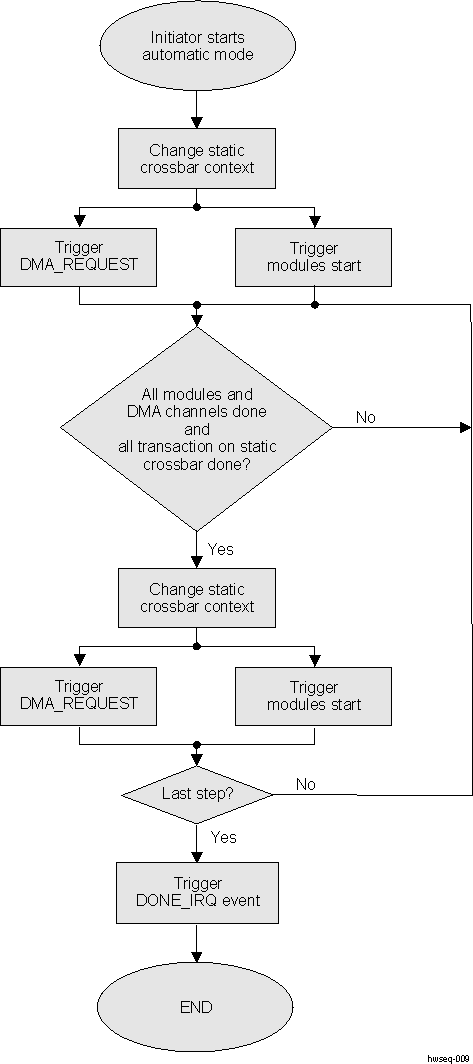 Figure 9-182 Hardware Sequencing Example
The external initiator configures the different SIMCOP modules and DMA channels. When this is complete, it enables the hardware sequencer. This resets the internal state of the hardware sequencer (pending events and context switch counter).
It starts by running sequence step SIMCOP_HWSEQ_CTRL[12:11] STEP:
- Clear all pending completion events that have been selected for Step 0 in the hardware sequencer. Note: This does not affect the SIMCOP_IRQSTATUS register.
- Apply step SIMCOP_HWSEQ_CTRL[12:11] STEP configuration to the static crossbar
- Start DMA transfers. Multiple channels can be enabled sequentially (that is, YUV4:2:0 data transfers or SIMCOP-SDRAM followed by SDRAM-SIMCOP) by using the SIMCOP DMA linking feature.
- Start hardware accelerators. The list of accelerators to start can be selected by software using the SIMCOP_HWSEQ_STEP_CTRL_i[7:0] *_SYNC register
The hardware sequencer then waits for completion of events from the selected SIMCOP modules and SIMCOP DMA channels.
The hardware sequencer also ensures that all SIMCOP memory accesses requested by the accelerators and DMA channels enabled for the synchronization step have completed. This condition prevents data corruption due to early switching.
Steps can be chained to define the sequence to execute. Steps are started until the step counter reaches the limit defined by software. When the last step has completed, a DONE_IRQ event is triggered.
The SIMCOP can execute one hardware sequence at the time. However, software can be used to execute multiple independent sequences in parallel (that is, two unrelated macroblock pipelines) using the override feature.
The hardware sequencer has no specific support for macroblock pipeline filling (pipe-up) or flushing (pipe-down). It needs some software intervention.
The hardware sequencer supports sequences composed of up to four steps. Longer sequences require software intervention.
Figure 9-182 illustrates the hardware sequencer operation.
 Figure 9-183 Hardware Sequencer Operation Example
The example involves utilization of two SIMCOP modules (or DMA channels) that are synchronized using the hardware sequencer. A total of five sequencing steps are executed (SIMCOP_HWSEQ_CTRL[31:6] HW_SEQ_STEP_COUNTER=5). The sequence is 2 steps long and starts with Step 1. Those two steps are configured using the SIMCOP_HWSEQ_STEP_*_i registers(where i = 0 and 1).
The SIMCOP modules processing is started using START pulses (green). When the SIMCOP modules are done, they return a DONE pulse (red). Software can choose which accelerators to run for a given step using the SIMCOP_HWSEQ_STEP_CTRL_i[7:0] *_SYNC registers. They do not need to finish at the same time because the hardware sequencer waits for reception of all DONE pulses of used accelerators before moving to the next step.
The hardware sequencer also triggers a series of interrupts that can be used by software. It is possible, for example, for software to change the configuration of inactive sequencing steps. This can be particularly useful to run longer sequences than what is supported by hardware.
For example, software can setup a 4-step long looping sequence: Step 0 → 1 → 2 → 3 → 0 → 1 → .... When the STEP1_IRQ event is triggered, software can load the configuration to be used next time Step 0 becomes active in the SIMCOP_HWSEQ_STEP_*_i registers.