TIDUE59A May 2018 – September 2020
- Description
- Resources
- Features
- Applications
- 1System Description
-
2System Overview
- 2.1 Block Diagram
- 2.2 Design Considerations
- 2.3 Highlighted Products
- 2.4 System Design Theory
- 3Hardware, Software, Testing Requirements, and Test Results
- 4Design Files
- 5Software Files
- 6Related Documentation
- 7Terminology
- 8About the Author
- 9Revision History
3.1.1.4 DRV8837EVM Modifications and Connections
By default, the DRV8837 on the DRV8837EVM is controlled by an onboard MSP430™ MCU, and the entire DRV8837EVM is powered through a micro-USB interface. To control the DRV8837 from the CC3220S, the following steps must be taken to modify the DRV8837EVM and connect it to the CC3220S LaunchPad.
- Remove R3 and R4 (0-Ω resistors) from the back of the DRV8837EVM to disconnect the IN1/IN2 signals of the DRV8837 from the MSP430 (see Figure 3-3).
- Provide power to the DRV8837 from the CC3220 LaunchPad by connecting the 5-V, GND pins of J23 on the CC3220S LaunchPad to J1 on the DRV8837EVM see Figure 3-4).
- Connect to the IN1 and IN2 test points on the DRV8837EVM from the CC3220S LaunchPad headers corresponding to P16 and P17 (see Figure 3-4).
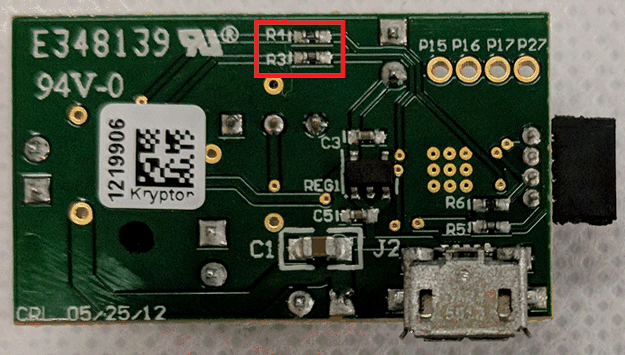 Figure 3-3 R3 and R4 Location on Back of DRV8837EVM
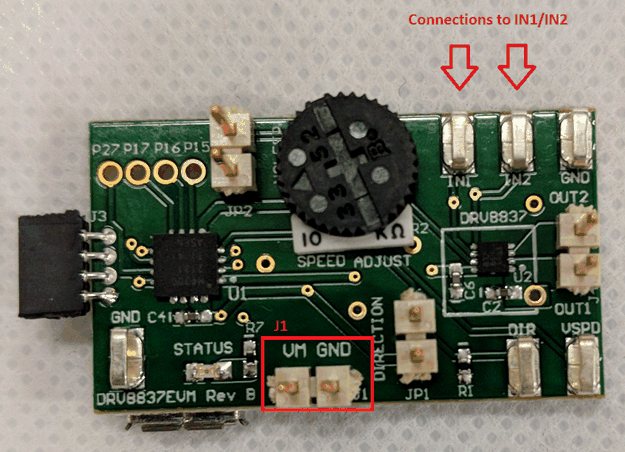 Figure 3-4 J1 and IN1/IN2 Highlighted on Front of DRV8837EVM
In this example, two GPIOs and one PWM signal are used to control the DRV8837. Table 3-3 lists the connections required between the LaunchPad and the modified DRV8837EVM when using the included reference software.
Table 3-3 CC3220 LaunchPad™ to DRV8837EVM Connection List
| CC3220 LAUNCHPAD | DRV8837EVM |
|---|---|
| P18 | nSleep (JP2) |
| P16 | IN1 (TP1) |
| P17 | IN2 (TP2) |
| 5V | VM (J1) |
| GND | GND (J1) |
Further modifications of the DRV8837EVM are necessary to accurately measure the power consumption of the motor. These modifications are described in Section 3.2.