SLAU863 October 2021
- Trademarks
- 1Features
- 2Equipment
-
3Setup Procedure
- 3.1 Install the High Speed Data Converter (HSDC) Pro Software
- 3.2 Install the Configuration GUI Software
- 3.3 Connect the EVM and TSW14J57EVM
- 3.4 Connect the Power Supplies to the Boards (Power Off)
- 3.5 Connect the Signal Generators to the EVM (Signal Generator's RF Outputs Disabled Until Directed)
- 3.6 Turn On the TSW14J57EVM Power and Connect to the PC
- 3.7 Turn On the ADCxxDJxx00RF-TRF1208-EVM Power Supplies and Connect to the PC
- 3.8 Turn On the Signal Generator RF Outputs
- 3.9 Open the ADC12DJ5200RFEVM GUI and Program the ADC and Clocks
- 3.10 Calibrate the ADC Device on the EVM
- 3.11 Open the HSDC Software and Load the FPGA Image to the TSW14J57EVM
- 3.12 Capture Data Using the HSDC Pro Software
- 4Device Configuration
- 5Troubleshooting the ADCxxDJxx00RF-TRF1208-EVM
- 6HSDC Pro Settings for Optional ADC Device Configuration
- 7Signal Routing
- 8References
- A Analog Inputs
- B Jumpers and LEDs
4.3 Low-Level Control
The Low Level View tab, illustrated in Figure 4-1, allows configuration of the devices at the bit-field level. At any time, the controls in Table 4-2 can be used to configure or read from the device.
Table 4-2 Low-Level Controls
| Control | Description |
|---|---|
| Register map summary | Displays the devices on the EVM, registers for those devices, and
the states of the registers.
|
| Write register button | Write to the register highlighted in the register map summary with the value in the Write Data field. |
| Write all button | Update all registers shown in the register map summary with the values shown in the Register Map summary. |
| Read register button | Read from the register highlighted in the Register Map
summary and display the results in the Read Data field. Can be used to re-synchronize the GUI with the state of the hardware. |
| Read-all button | Read from all registers in the Register Map summary and display the current state of the hardware. |
| Load Configuration button | Load a configuration file from disk and register address or data values in the file. |
| Save Configuration button | Save a configuration file to the disk that contains the current state of the configuration registers. |
| Register Data cluster | Manipulate individual accessible bits of the register highlighted in the register map summary. |
| Individual register cluster with read or write register buttons | Perform a generic read or write command to the device shown in the Block drop-down box using the address and write data information. |
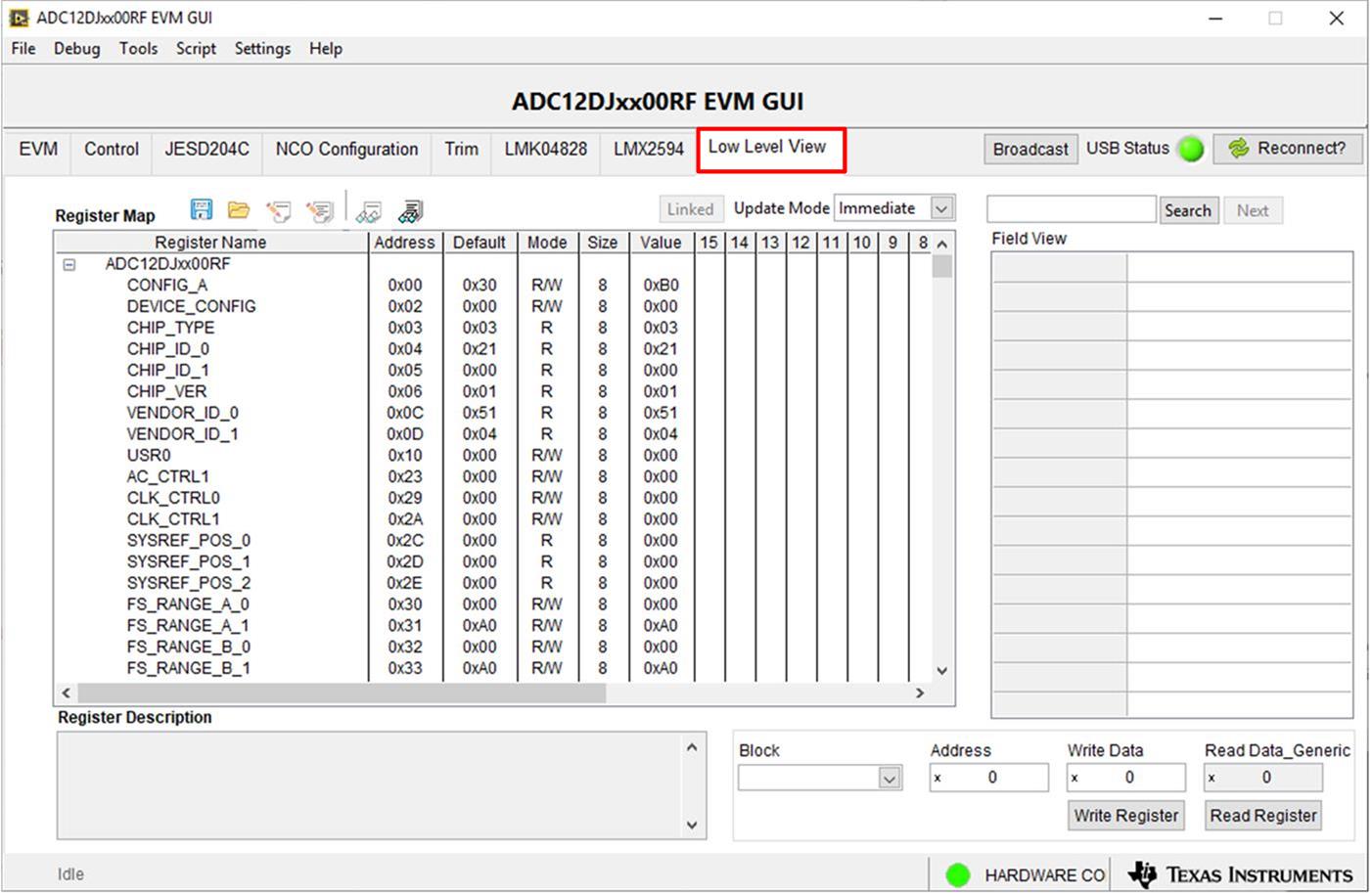 Figure 4-1 Low-Level
Register Control Tab
Figure 4-1 Low-Level
Register Control Tab