SLUSG57 July 2025 UCC21351-Q1
PRODUCTION DATA
- 1
- 1 Features
- 2 Applications
- 3 Description
- 4 Pin Configuration and Functions
-
5 Specifications
- 5.1 Absolute Maximum Ratings
- 5.2 ESD Ratings (Automotive)
- 5.3 Recommended Operating Conditions
- 5.4 Thermal Information
- 5.5 Power Ratings
- 5.6 Insulation Specifications
- 5.7 Safety Limiting Values
- 5.8 Electrical Characteristics
- 5.9 Switching Characteristics
- 5.10 Insulation Characteristics Curves
- 5.11 Typical Characteristics
- 6 Parameter Measurement Information
- 7 Detailed Description
-
8 Application and Implementation
- 8.1 Application Information
- 8.2
Typical Application
- 8.2.1 Design Requirements
- 8.2.2
Detailed Design Procedure
- 8.2.2.1 Designing INA/INB Input Filter
- 8.2.2.2 Select External Bootstrap Diode and its Series Resistor
- 8.2.2.3 Gate Driver Output Resistor
- 8.2.2.4 Gate to Source Resistor Selection
- 8.2.2.5 Estimate Gate Driver Power Loss
- 8.2.2.6 Estimating Junction Temperature
- 8.2.2.7 Selecting VCCI, VDDA/B Capacitor
- 8.2.2.8 Dead Time Setting Guidelines
- 8.2.2.9 Application Circuits with Output Stage Negative Bias
- 8.2.3 Application Curves
- 8.3 Power Supply Recommendations
- 8.4 Layout
- 9 Device and Documentation Support
- 10Revision History
- 11Mechanical, Packaging, and Orderable Information
8.4.2 Layout Example
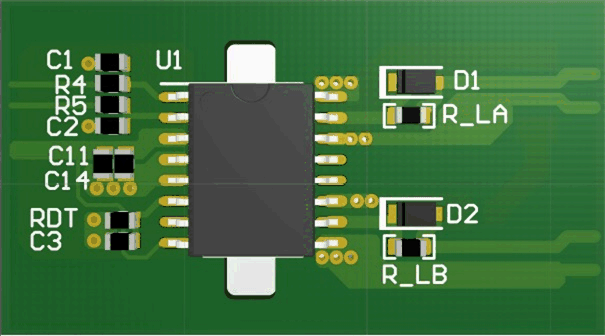
Figure 8-6 shows a 2-layer PCB layout example with the signals and key components labeled.
 Figure 8-6 Layout
Example
Figure 8-6 Layout
ExampleFigure 8-7 and Figure 8-8 shows top and bottom layer traces and copper.
There are no PCB traces or copper between the primary and secondary side, which ensures isolation performance.
PCB traces between the high-side and low-side gate drivers in the output stage are increased to maximize the creepage distance for high-voltage operation, which will also minimize cross-talk between the switching node VSSA (SW), where high dv/dt may exist, and the low-side gate drive due to the parasitic capacitance coupling.
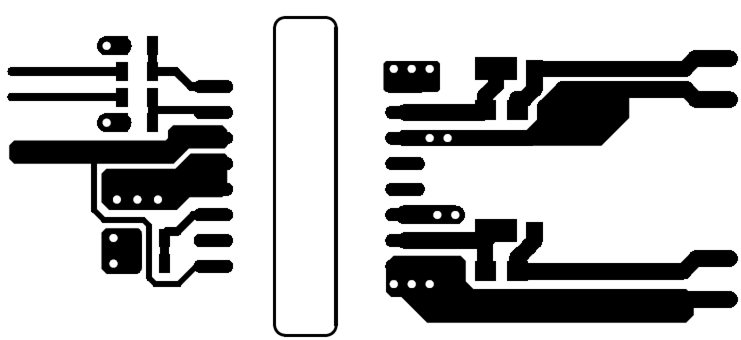
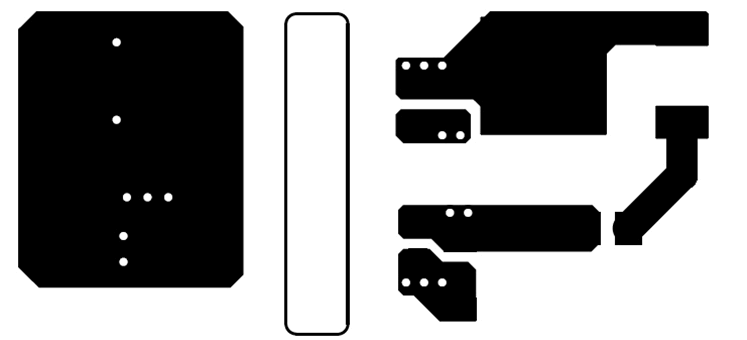
Figure 8-9 and Figure 8-10 are 3D layout pictures with top view and bottom views.
The location of the PCB cutout is between the primary side and secondary sides, which ensures isolation performance.