SLAU967 November 2025 MSPM0G5187
2.1 Hardware Overview
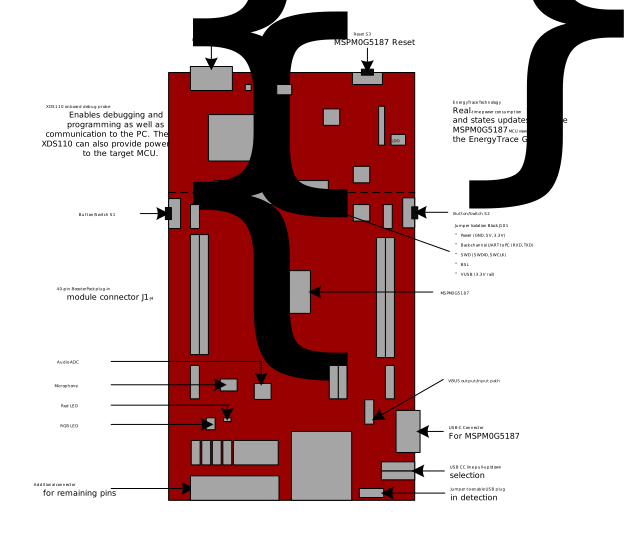 Figure 2-1 Diagram of LP-MSPM0G5187 Jumpers and Connections
LP-MSPM0G5187 has many hardware features, which allow the user full access to the MSPM0G5187 pins, while still providing onboard connectivity for easy use. Shunt connections provide a way for the user to easily change the LaunchPad™ configuration. The location of these shunts is shown in Figure 2-1. The connection of each shunt is described in Table 2-1. The default configuration is to have all shunts populated.
Table 2-1 Jumper Information
| Jumper | Description | Default Setting | Connected Signal |
|---|---|---|---|
| J1-J4 | BoosterPack™ header block | Unpopulated | BoosterPack™ standard connection for pins 1-40, see schematic for details |
| J5 | 3.3V power header | Unpopulated | Additional pin connections for GND and 3.3V |
| J6 | Analog power header | Unpopulated | OFF to disconnect power to SD slot, microphone, and audio ADC (PCM1809) |
| J7 | 5V power header | Unpopulated | Additional pin connections for GND and 5V |
| J8 | BSL invoke | Populated | Connects PA18 to the S1 button |
| J9 | Red LED | Populated | Connects PA0 to the Red LED |
| J10 | S2 jumper | Populated | Connects PA7 to the S2 button |
| J11 | RGB (Blue) LED | Populated | Connects PB13 to the RGB (Blue) LED |
| J12 | RGB (Red) LED | Populated | Connects PBA17 to the RGB (Red) LED |
| J13 | RGB (Green) LED | Populated | Connects PA24 to the RGB (Green) LED |
| J14 | Open drain pullup selector | Populated: Top and center (1-2) | Pullup selector for 3.3 or 5V connection for PA0 |
| J15 | Open drain pullup selector | Populated: Top and center (1-2) | Pullup selector for 3.3 or 5V connection for PA1 |
| J17-J19 | LP-MSPM0G5187 pin extension header (unlabeled – bottom of board) | N/A | See schematic for details |
| J20 | LP-MSPM0G5187 pin extension header (unlabeled – bottom of board) | Unpopulated | See schematic for details |
| J21 | LP-MSPM0G5187 pin extension header (unlabeled – bottom of board) | N/A | See schematic for details |
| J22 | USB2 power header | Unpopulated | Connects to enable USB2 VBUS from on-board 5V (only applicable in USB HOST mode) |
| J23 | USB2 VBUS detection header | Unpopulated | Connects PB21 to USB2 VBUS (with 2/5 voltage divider resistor circuit) |
| J24, J25 | USB2 CC Line pull-up or pulldown selector | Populated: Right and center (1-2) | Pullup and pulldown selector for USB CC line, default is pulldown with 5.11KΩ |
| J101 | XDS110-ET isolation block | Populated | GND, 5V, 3V3, RXD, TXD, NRST, SWDIO, SWCLK, BSL, VUSB |
| J102 | XDS110-ET OUT | Unpopulated | GND, 3V3, SWDIO, SWCLK, NRST |
| J103 | XDS110-ET IN | Unpopulated | GND, 3V3, SWDIO, SWCLK, NRST |